
ProfitMaps AI Review: The Real App Walkthrough, the $297 Gold Bundle Maths, and Whether Map-Rank Scans Can Win You Local Clients
ProfitMaps AI scans where a local business shows up on Google Maps from a grid of points around it, turns the result into a map, a competitor list and a written action plan, and then helps you sell the fix with a sample website, lead capture, follow-up emails and branded reports. It launches on JVZoo on October 21, 2026: Basic is $37 one-time, and the Gold Bundle is $297 one-time for every upgrade, white label and a live workshop. I rate it 7.8/10. The scanner and the way it feeds everything else are genuinely useful, and the demo is a recording of the real app. My recommendation is the Gold Bundle, because Basic's limits (10 businesses, 2 keywords each) are tight for anyone selling to clients, and Gold replaces about $859 of add-ons. The catches: scans use credits and the pool sizes weren't published before launch, and some bundle features switch on after launch.
Disclosure: this review contains affiliate links, so I may earn a fee if you buy, at no extra cost to you. Full disclosure & disclaimer.
TheStackLens score
ProfitMaps AI Review: Quick Verdict
Most local-marketing launches hand you a website builder and a list of businesses, and leave you to convince the owner. ProfitMaps AI starts with proof: a map of where the business appears in Google's top three, point by point, and who beats it everywhere else. Everything after that (the action plan, posts, pages, the sample site, leads and reports) builds on that scan. Get the Gold Bundle ($297 one-time) if you plan to sell this as a service: it includes every upgrade, white label, 50 businesses with 5 keywords each and the live workshop. Basic ($37) is fine for scanning your own business or testing the idea on a handful of prospects.
✔ What I like
- The grid map makes an owner's problem obvious in seconds
- Every scan feeds a specific action plan, not generic SEO tips
- Credit cost is shown before every scan, with your balance after
- Content tools flag claims that need the owner's confirmation
- Site builder, lead inbox and follow-ups in the same app
- The demo is a recording of the real app, labelled as such
✘ What I don't like
- Credit pool sizes and top-up prices weren't published pre-launch
- Basic's limits (10 businesses, 2 keywords) are tight for client work
- The claim-your-site page wasn't shown in the demo ("still planned")
- White-label client accounts switch on 30 days after launch
- Several add-on prices were still "to confirm" on vendor pages
- Weekly scans on bigger grids burn credits fast
ProfitMaps AI Coupon Code & Bundle Deal
NO CODENo coupon code has been announced. The real discount is the Gold Bundle: $297 one-time for Basic plus every upgrade, white label, the Pitch Pack and the 3-day live workshop. Bought separately, those come to about $859. Launch pricing ends Tuesday, October 27 at 11:59 PM EDT, after which the bundles become monthly plans for new buyers, according to the vendor.Gold Bundle ★ Best value
- Basic + Pro + Business Finder + Agency
- White label + 10 client accounts
- 50 businesses, 5 keywords, 50 sites
- 9×9 grids, 30 Finder searches/mo
- 3-day live workshop + GBP course
Basic
- 10 businesses, 2 keywords each
- 10 websites, 5×5 scans
- Reports, action plans, content, leads
- 1 user
Platinum Bundle
- Everything in Gold
- Unlimited businesses, keywords, sites (fair use)
- 100 white-label client accounts
- Agency Plus, largest credit pool
What Is ProfitMaps AI?
Ask a plumber where they rank on Google Maps and they'll usually search from their own office and say "we're near the top". That's the problem: Google Maps results change street by street. A business can be first from its car park and invisible two miles away, where most of its customers live.
ProfitMaps AI makes that visible. You add a business and a keyword (say, "plumber ocoee"), choose a grid (5×5 points by default) and a radius, and it checks the real Google Maps results from every point. The result is a map with a rank on each point: green where the business is in the top three, red where it's buried, and "20+" where it doesn't show up at all. From there the app lists the competitors winning those points, writes an action plan from the scan, generates Google Business Profile posts and page articles, plans and builds a local website with lead capture, follows up with leads by email, and packages it all into branded reports and share links.
The idea is that you use the map to start a conversation with a business owner ("here's where customers can't find you"), then sell the fix as a service. ProfitMaps AI is made by Chad Nicely, launched with Karthik Ramani, and sold on JVZoo. The launch runs from Wednesday, October 21, 2026 at 11:00 AM EDT to Tuesday, October 27 at 11:59 PM EDT, with webinars on October 20 at 8:00 PM ET and October 21 at 10:00 AM ET.
How ProfitMaps AI Works: Scan to Client, Step by Step
The vendor's walkthrough is a recording of the real app (made in October 2026, with business names changed), covering a hair salon and a plumber from first scan to shared report. Here's each step, with screenshots from that recording.
- Start from the dashboard. It shows how much of the map your businesses hold in the top three, recent scans, keywords tracked and credits used in the last 30 days, with a live map for one business and a list of recently generated content.
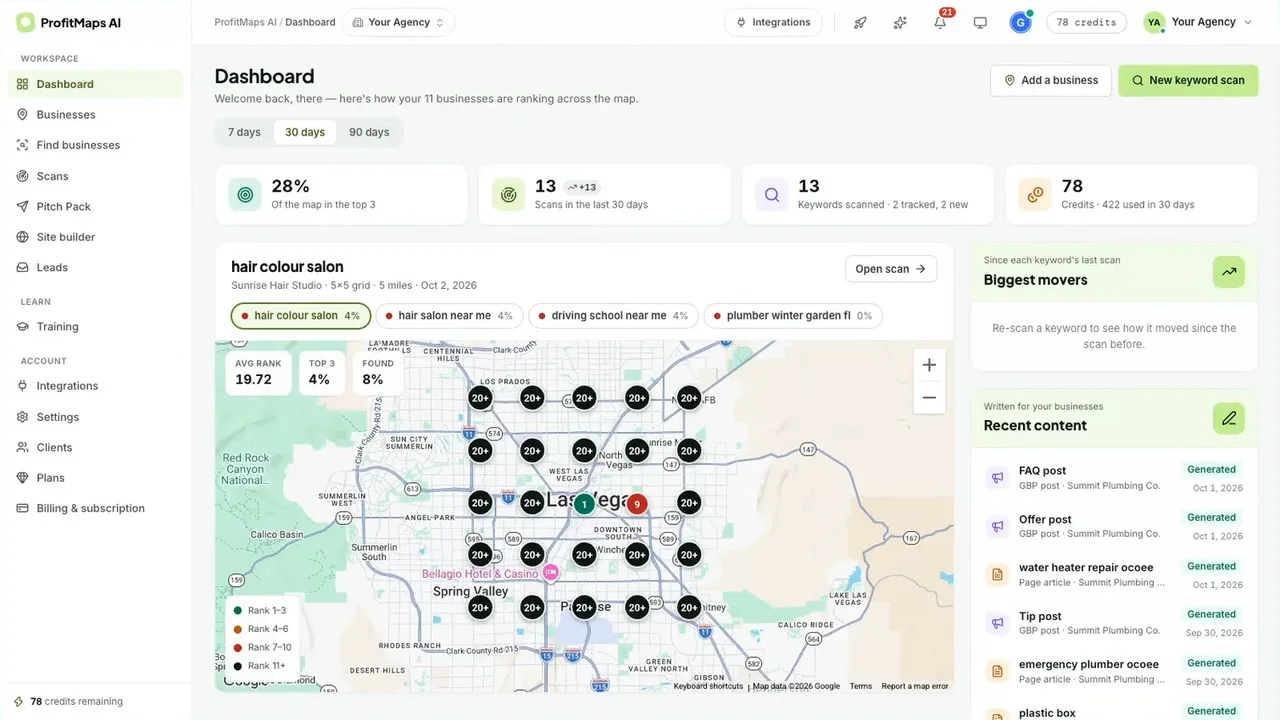
Step 1: the dashboard, with coverage, scans and credits at a glance - Add businesses and see every scan in one place. Each business gets its own workspace with keywords, scan history, site plan, page articles, posts and leads. The Scans view lists every business with its best keyword, top-3 percentage and last scan date.
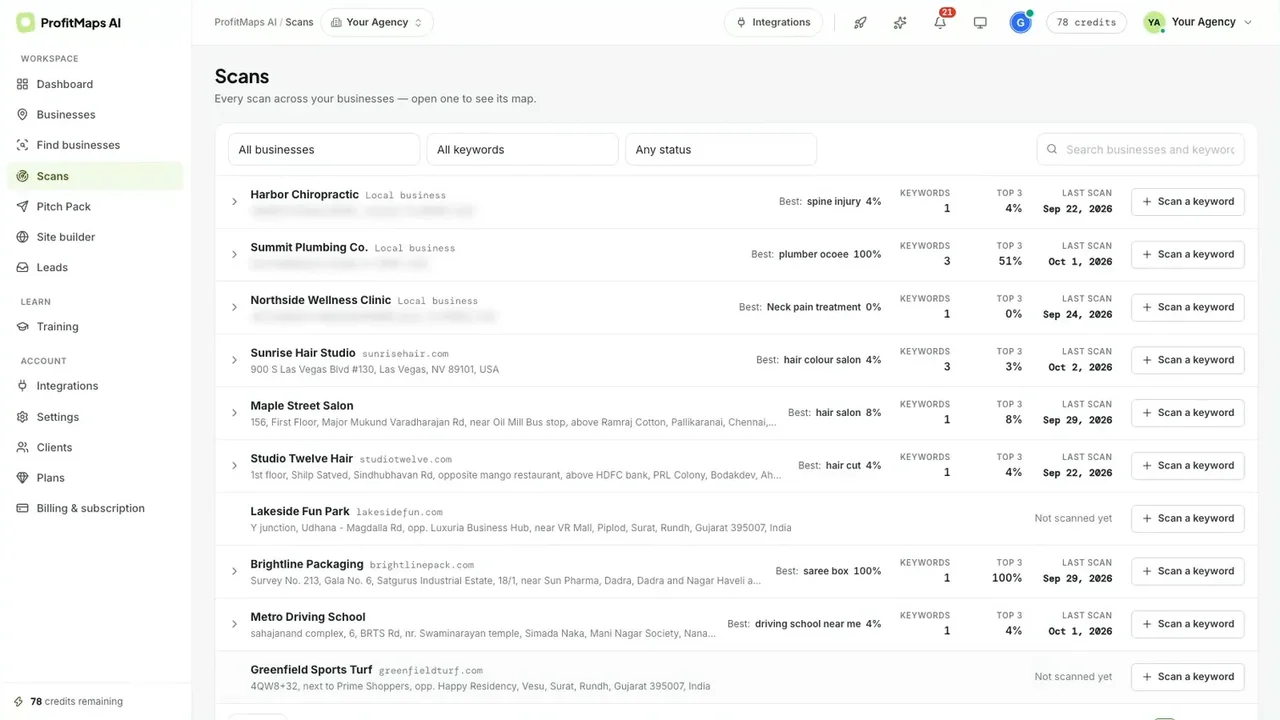
Step 2: every business and its latest scan - Set up a scan, and see the cost first. Choose the keyword, grid size and radius. The box shows the grid, the cost and your balance after: a 5×5 grid over 5 miles is 25 points and 25 credits, taking the demo account from 78 to 53.
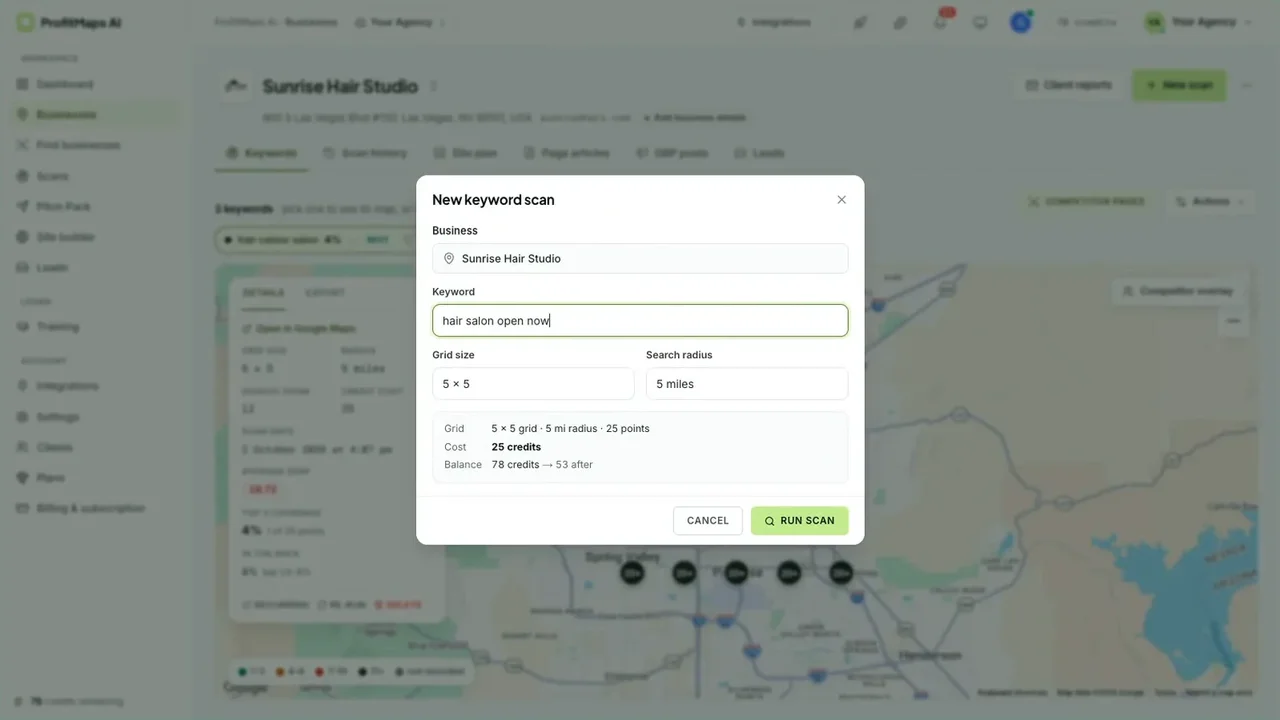
Step 3: one credit per grid point, shown before you run it - Read the map. Each point is where the business ranks when someone searches from that spot. The side panel gives the grid, radius, scan date, average rank, top-3 coverage and "in the pack" share. In the demo, the salon held the top three from just 1 of 25 points (4%), with an average rank of 19.72.
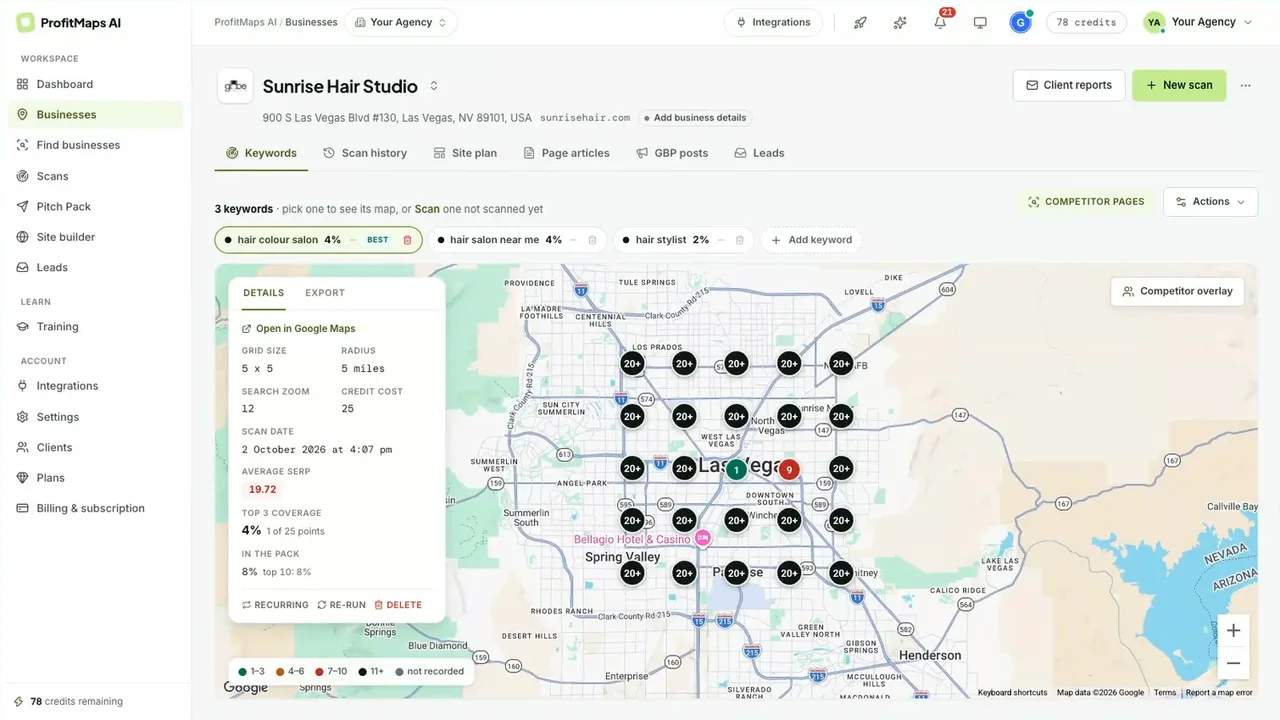
Step 4: the map that does the selling - Click any point. You see the actual businesses ranking from that spot, with distance, rating and review count, plus tabs for their pages and the point's ranking history, and an "AI ranking coach" button.
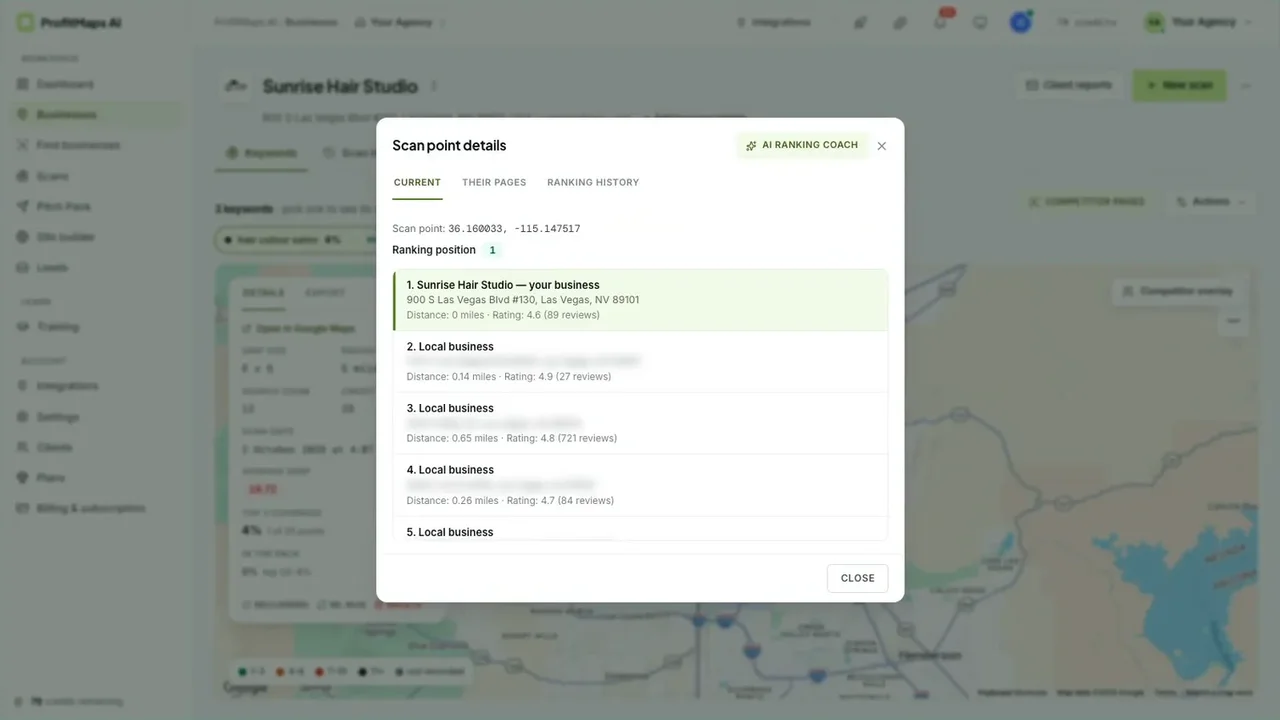
Step 5: who ranks from each point - See who's winning the grid. The competitor overlay ranks the businesses taking the most points, with their average position and review counts. This is far more convincing to an owner than "your competitors are ahead".
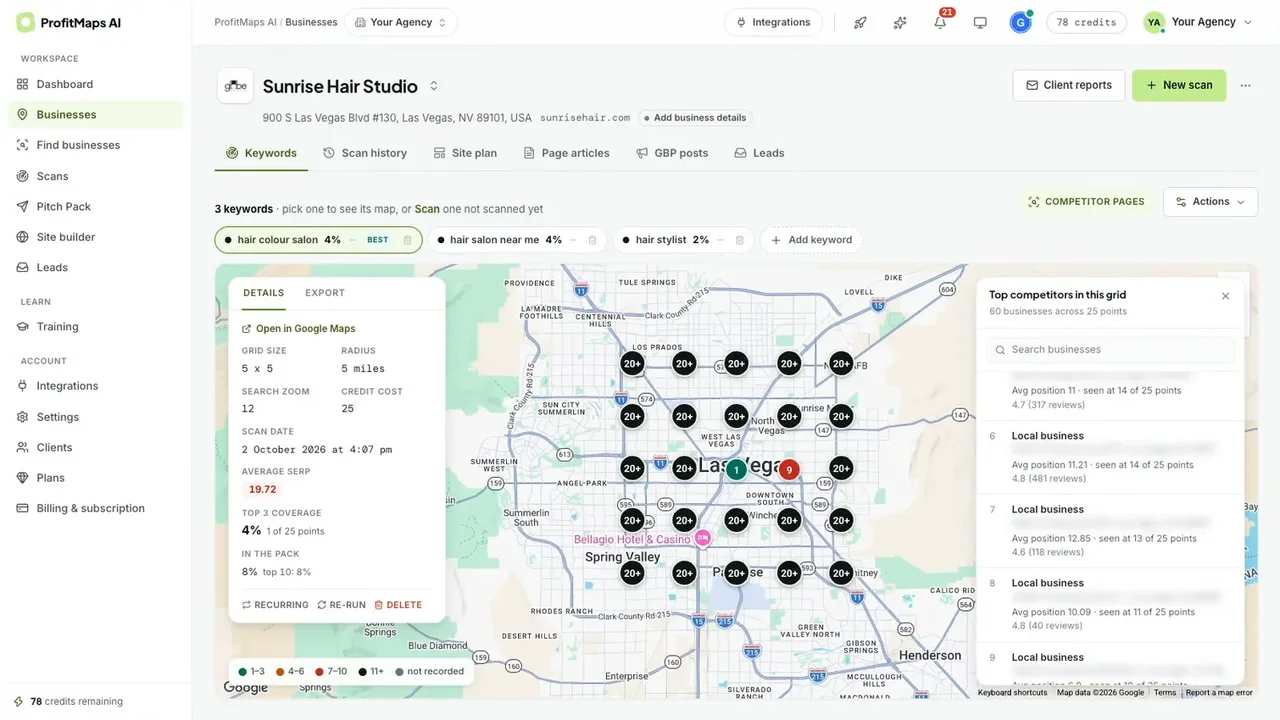
Step 6: the competitor overlay - Get the action plan. The plan is written from that scan's numbers. For the salon it pointed to a review gap (89 reviews against competitors with hundreds), a weak rating gap and a missing dedicated colour page, with specific, practical steps.
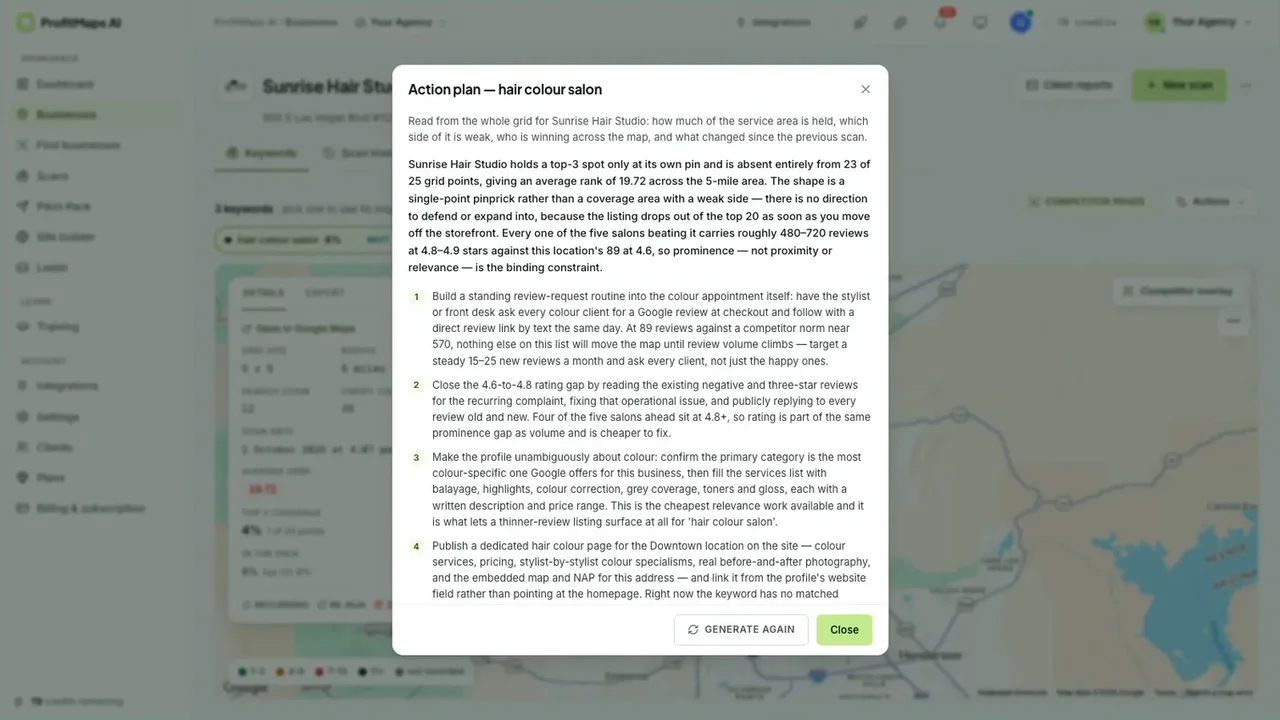
Step 7: a plan written from the scan, not a template - Create posts and articles. The GBP posts tab generates FAQ, offer and tip posts for each keyword. The page article editor shows the meta description and reading grade, and flags claims that need the owner's confirmation before publishing, which is exactly what you want from AI content written about someone else's business.
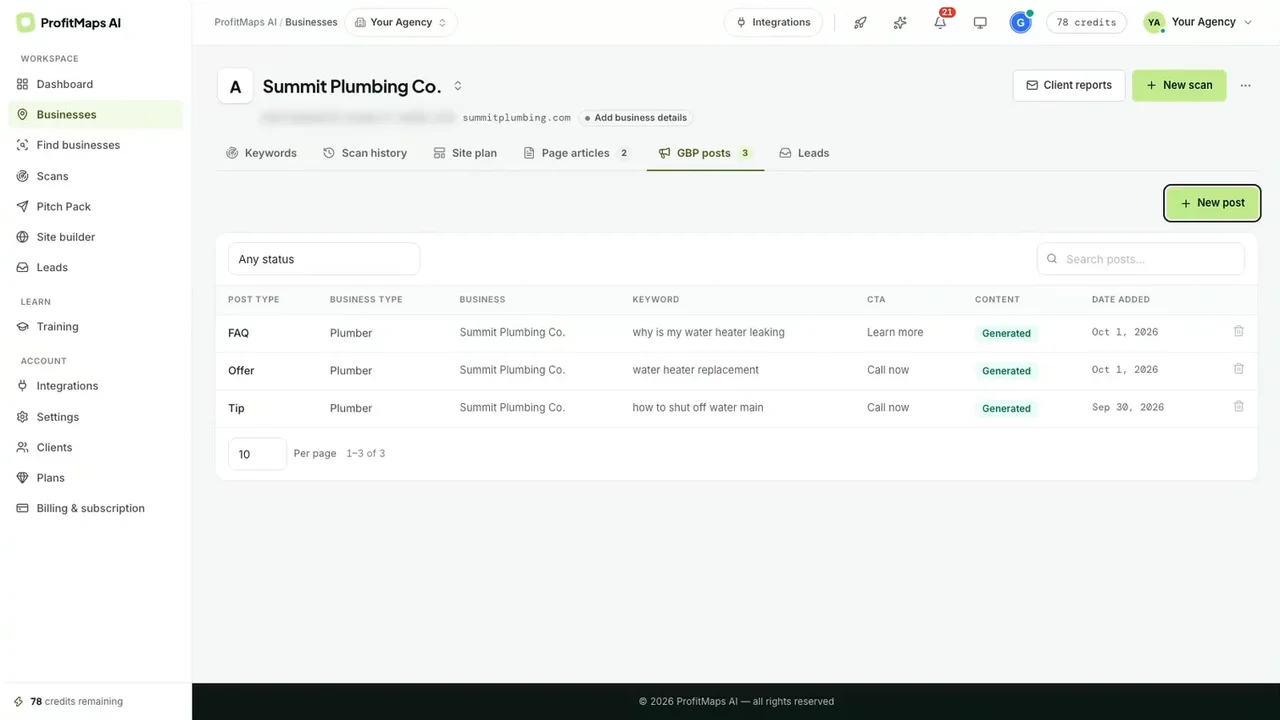
Step 8a: GBP posts per keyword 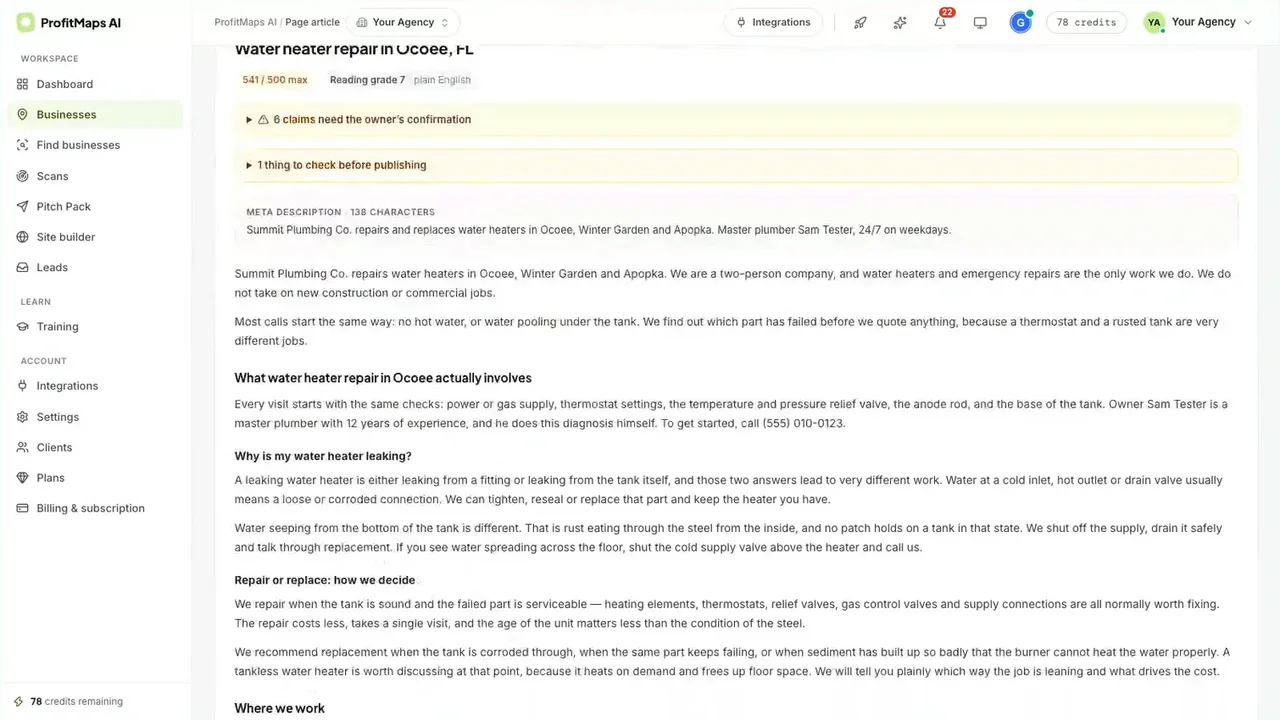
Step 8b: the article editor flags claims to confirm - Plan and build the site. The site plan lists each page (home, about, services, a service page, an area page, FAQ, contact). The app warns you when a plan has no contact page, because then leads have nowhere to go. Then you build, edit, publish and send a test lead.
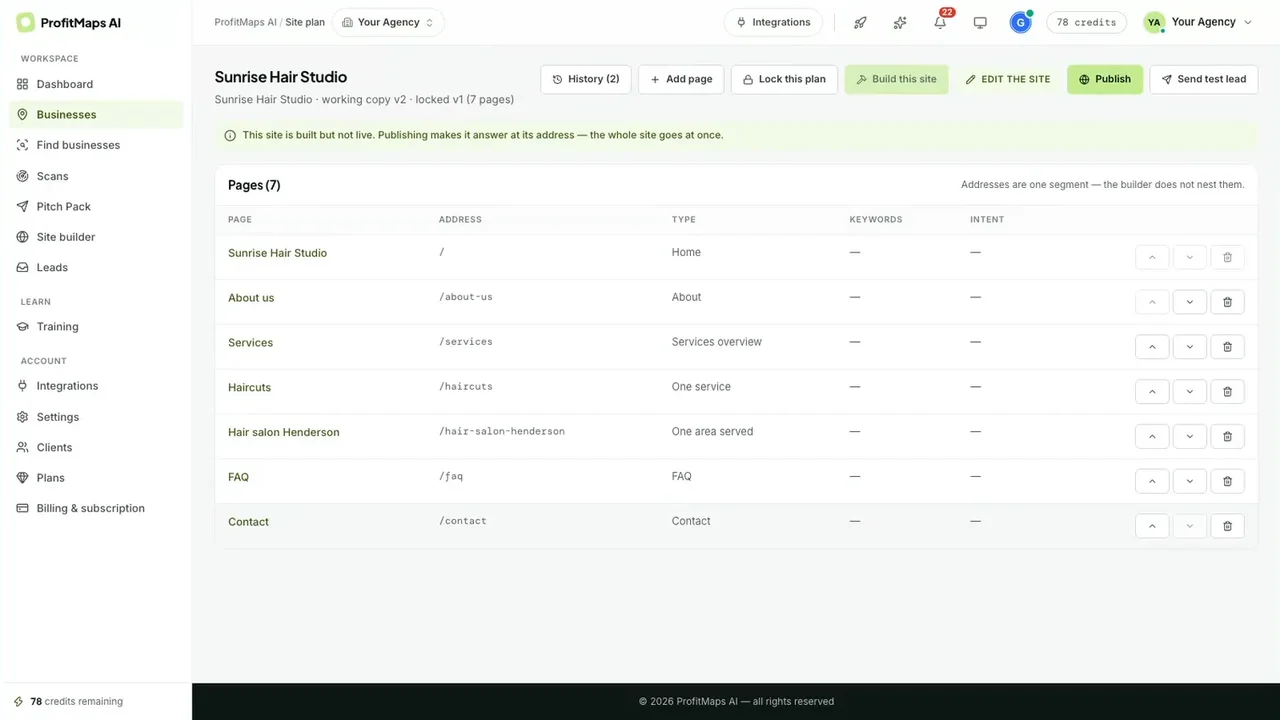
Step 9: plan the pages, then build and publish - Catch leads and follow up. Enquiries from every site land in one Leads inbox with type and status (new, contacted, won, lost), filters for real versus test leads and a CSV export. Automatic follow-up can send two or three friendly emails until you mark a lead won or lost. It requires your postal address first.
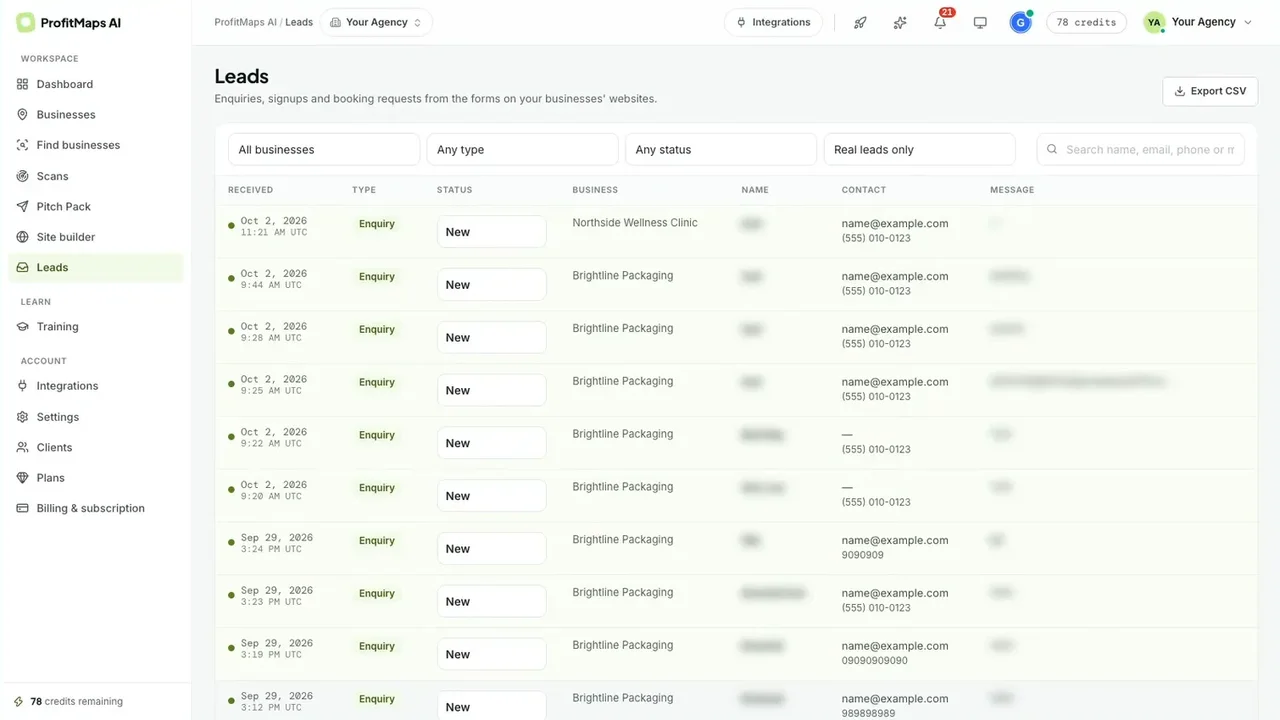
Step 10a: one inbox for every site's leads 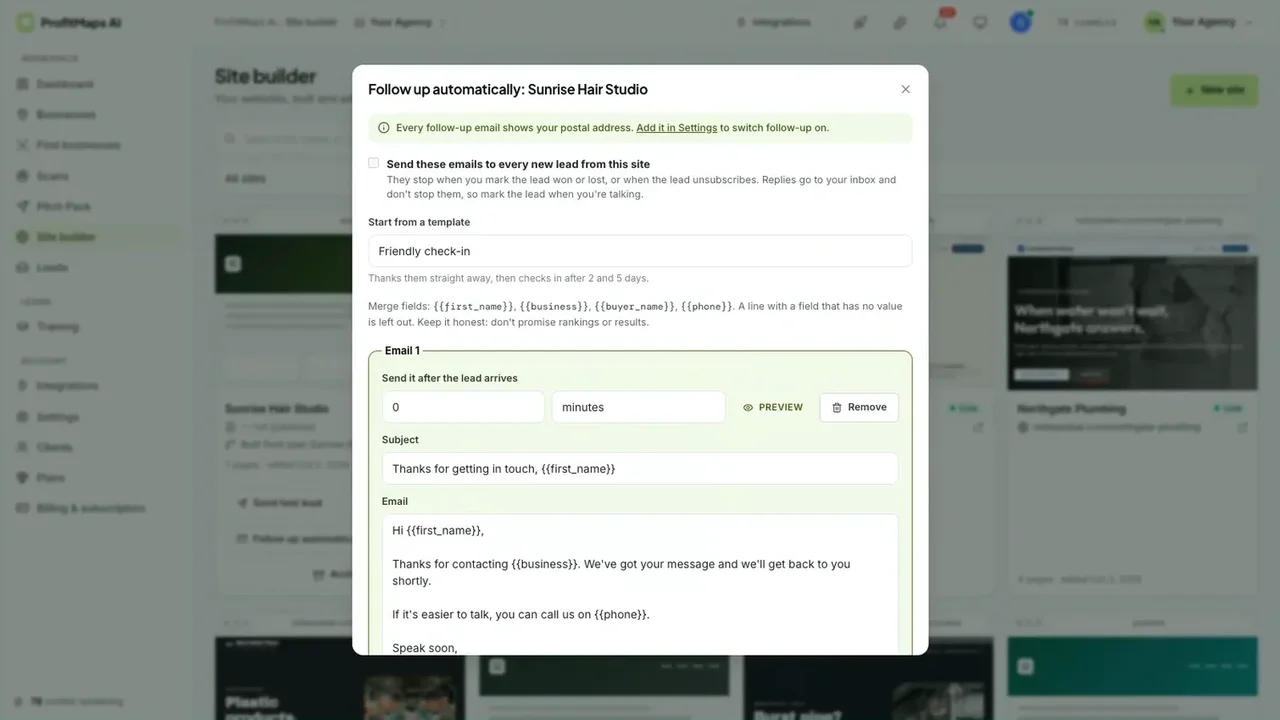
Step 10b: automatic follow-up, with an honesty note in the editor - Share the report. A share link opens the scan as a read-only, branded report. You choose whether to include the action plan and when the link expires (7, 30 or 90 days), and you can revoke it later. Reports also export as PDF or spreadsheet, and settings let you add your logo and colour and hide "Prepared with ProfitMaps AI".
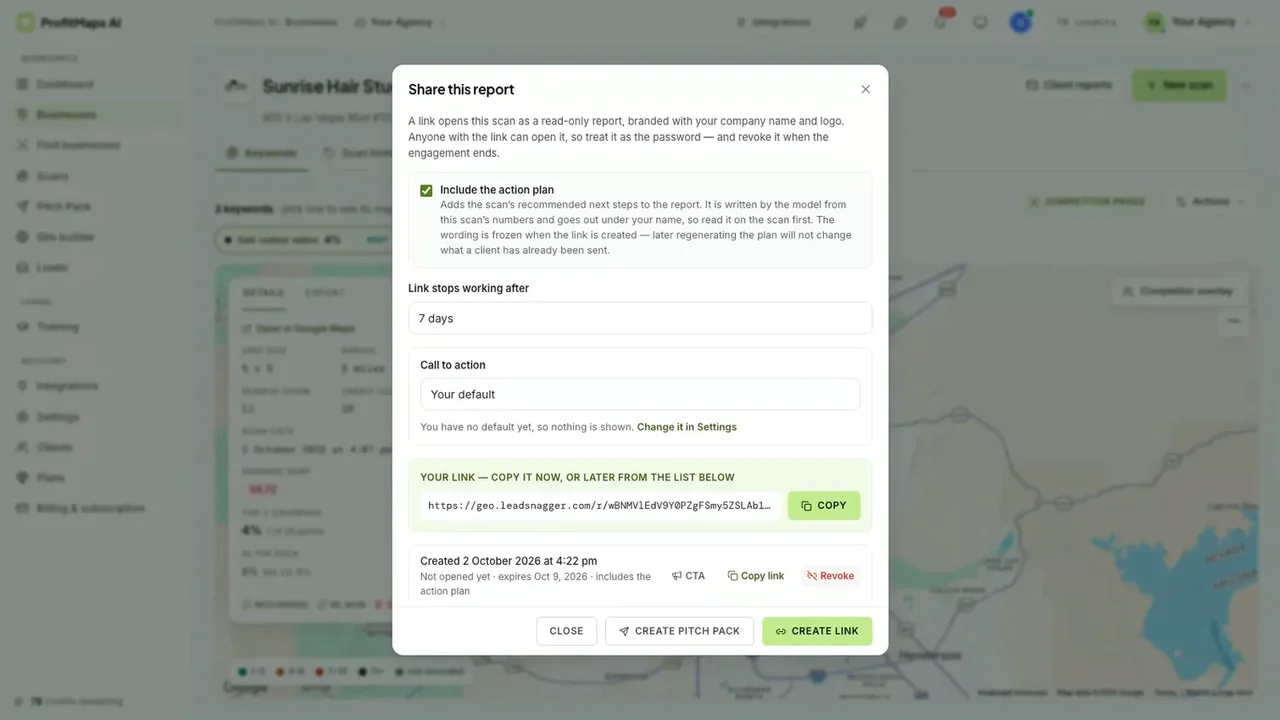
Step 11a: share links that expire and can be revoked 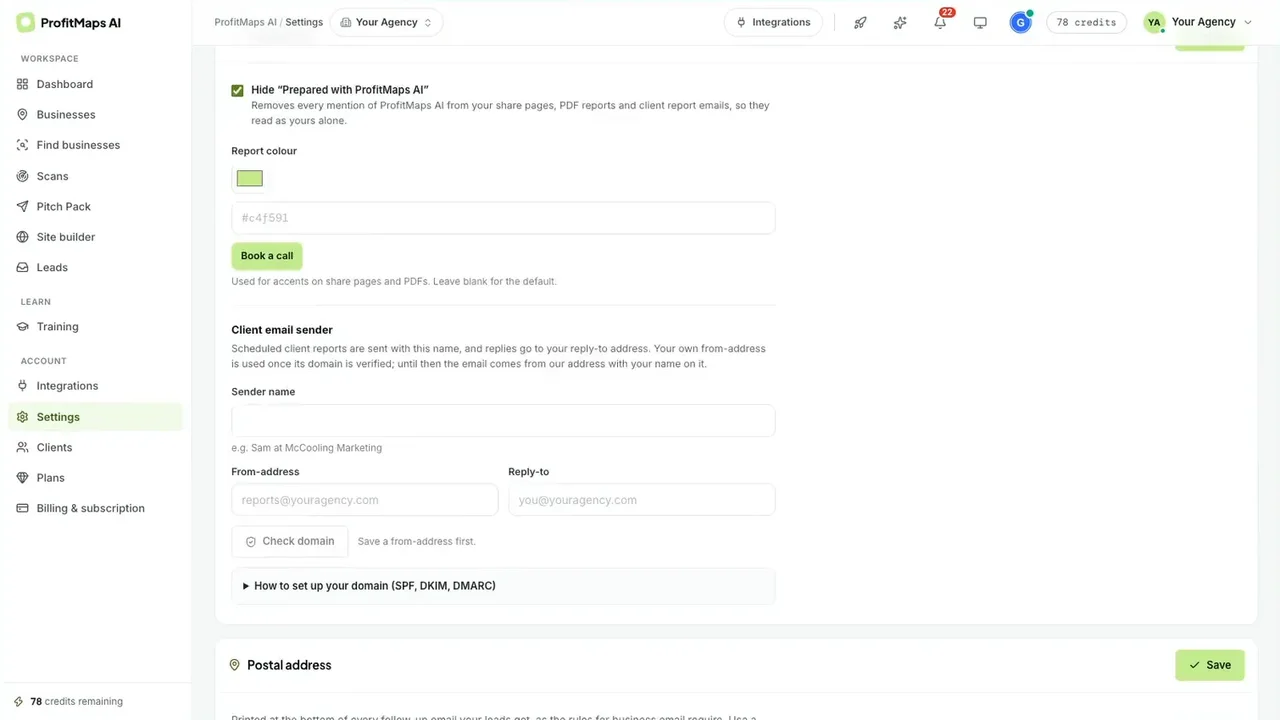
Step 11b: your branding, your sender domain - Find the next business to contact. Business Finder (included in both bundles) searches a business type in an area, shows the cost first (a 7×7 search is 49 credits), and scores every business 0–99 by how often it appears in the top three. In the demo, "dentist" in Las Vegas found 234 businesses, 177 of them scoring 0. Filters pick out businesses with no website or no rankings.
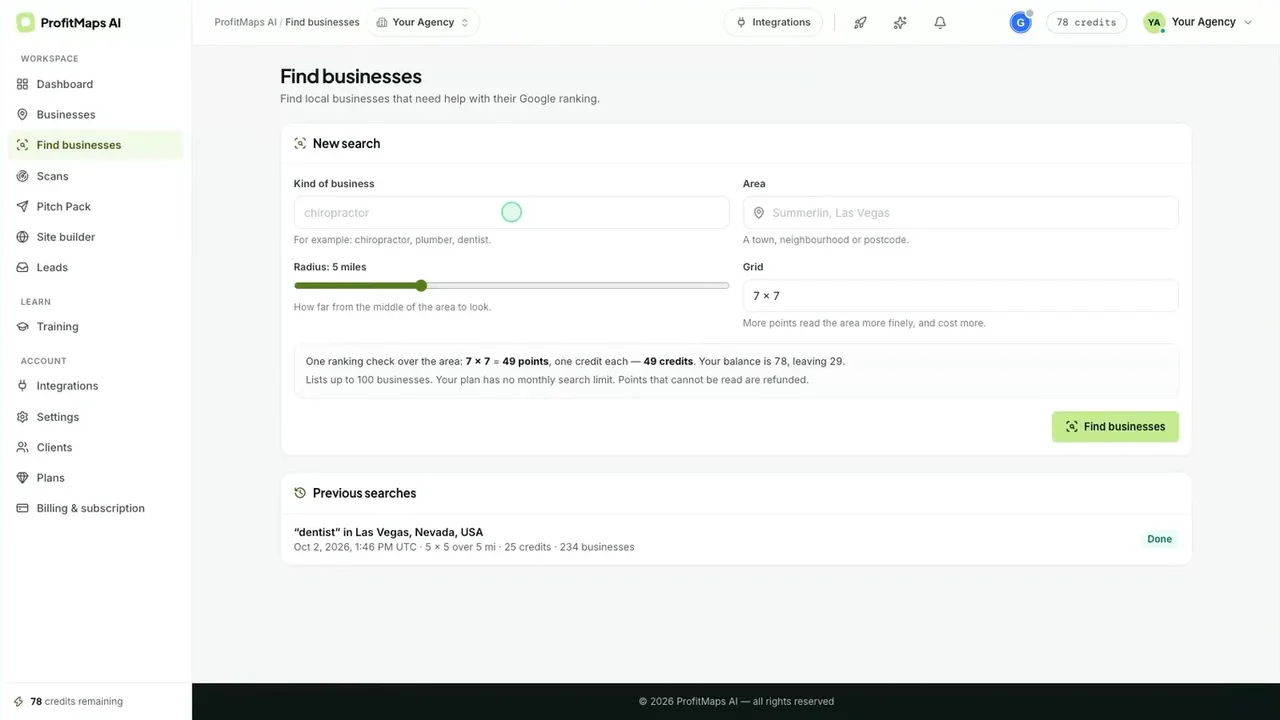
Step 12a: Business Finder, with the cost before you search 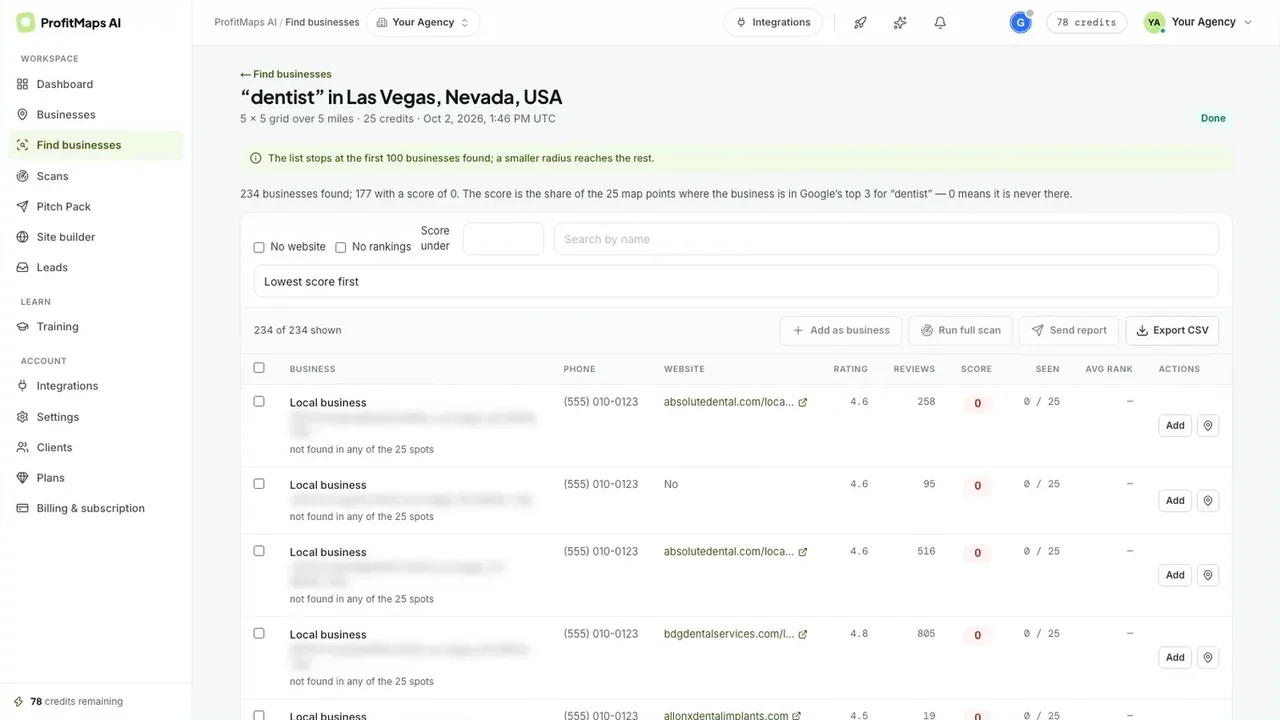
Step 12b: every business scored; 0 means never in the top three
Before Step 3, work out your credits. My Bonus #3 shows how fast recurring scans use up your pool, Bonus #4 picks the right grid and radius, and Bonus #6 turns the map's numbers into a plain-English message for the owner.
What Stood Out in the Walkthrough
This is the part a sales page won't give you. Here's what I took from going through the recording and the vendor's pages, area by area.
| Area | What I found |
|---|---|
| Grid scan + map | The best part, and the reason to buy. A rank on every point, a clear legend, scan details and point-level competitor lists. It's the kind of proof that makes an owner pay attention |
| Cost visibility | Honest by design. Grid, cost and balance-after are shown before every scan and every Finder search, and points that can't be read are refunded |
| Action plan | Specific, not generic. It used the scan's own numbers (review counts, ratings, the missing page) and gave concrete steps. You'll still want to read it before a client does |
| Content tools | Careful in the right places. The article editor flags claims that need the owner's confirmation, and the follow-up editor reminds you not to promise rankings |
| Sites + leads | Joined up. The site plan, builder, test leads, inbox and follow-ups all live in the same workspace as the scan, so you're not juggling tools |
| Sharing | Thoughtful controls. Expiring, revocable links with an optional action plan. Treat the link like a password: anyone with it can open the report |
| Business Finder | A real prospecting edge. A score built from top-three appearances is a sharper filter than "no website". It's in both bundles, not in Basic |
| Claim page | Not shown yet. The demo's own caption says the claim page that lets an owner pay you is "still planned" and not shown. The bundle page says it must exist at launch. Test it before you rely on it |
ProfitMaps AI Features
| Feature | Where it is | My take |
|---|---|---|
| Grid rank scans + map | Basic (5×5) / Gold (up to 9×9) | Real Google Maps results from each point, a rank per point, scan history and recurring scans. |
| Competitor view + action plan | Basic | Who wins the grid, and a written plan from each scan. |
| GBP posts, page articles, keyword finder | Basic | Content per keyword, with claims flagged for the owner's confirmation. |
| Site planner + builder + lead capture | Basic (10 sites) / Gold (50) | Plan, build, publish, test leads and a leads inbox. Building sites doesn't use credits. |
| Reports + share links | Basic | PDF, spreadsheet or link with your name and logo. Basic shows a "Prepared with ProfitMaps AI" line. |
| Built-in AI + MCP connection | Basic | No AI key needed. You can optionally connect your own assistant (Claude, ChatGPT and others). |
| Pitch Pack | Bump (~$17) / both bundles | From each scan: a branded one-page PDF, cold email, text and follow-ups on days 3, 7 and 14. |
| Automatic follow-ups + branding | Pro ($67) / both bundles | Follow-up emails to leads and full branding on reports. |
| Business Finder | $97 / both bundles | Search a niche and area, score each business 0–99, filter by no website or no rankings. Gold includes 30 searches a month. |
| Agency workspaces + team | ~$147 / both bundles | A workspace per client, read-only client logins and team members (Gold: 10 workspaces, 3 team). |
| White label + client accounts | Both bundles | Your brand everywhere, your sending domain, client sites on your domain, and white-label client logins (Gold 10, Platinum 100) from November 26. |
| 3-day live workshop + GBP course | Workshop in both bundles | A live Zoom workshop with Chad on November 2–4, plus a Google Business Profile course and one-day training. |
ProfitMaps AI Credits, Limits & Fine Print
| Question | Answer |
|---|---|
| How are scans charged? | One credit per grid point: a 5×5 scan is 25 credits, 7×7 is 49 and 9×9 is 81. Business Finder searches use credits the same way. Building websites doesn't. |
| How many credits do I get? | Each plan includes a credit pool, but the vendor's pages didn't publish pool sizes, top-up prices or expiry before launch. Check your balance after buying (my Bonus #3 does the maths). |
| What are Basic's limits? | 10 businesses, 2 keywords each, 10 websites, 5×5 scans and 1 user. |
| What are Gold's limits? | 50 businesses, 5 keywords each, 50 websites, grids up to 9×9, 30 Business Finder searches a month, 10 client workspaces, 3 team members and 10 white-label client accounts. |
| Where does the ranking data come from? | Real Google Maps results checked from each grid point when the scan runs. ProfitMaps AI isn't affiliated with Google. |
| Do I need my own AI key? | No. AI is built in. Connecting your own assistant is optional. |
| How do clients pay me? | On the bundles' claim pages, owners send an order request or ask for a call, and you take payment yourself, so ProfitMaps takes no cut. This page wasn't shown in the demo. |
| One-time or subscription? | Launch purchases are one-time. After October 27, the vendor says the bundles become monthly plans for new buyers (Platinum $297/month), while launch buyers keep their one-time access. |
| Refund window? | 30 days, by emailing support. The vendor says no proof or forms are needed. |
My advice: in your first week, scan a business you know well, then search the same keyword yourself from two points on the grid and compare. My Bonus #1 lists the 12 claims worth checking, with your 30-day refund date counting down.
ProfitMaps AI Pricing, OTOs & Bundles
Prices come from the vendor's JV page, sales page and bundle page. Some add-on prices were still marked "to confirm" before launch, so check the checkout.
Path 1: The Gold or Platinum Bundle (recommended)
| Bundle | Launch price | What it includes |
|---|---|---|
| Gold Bundle | $297 one-time | Basic, Pitch Pack, Pro, Business Finder, Agency, White Label, claim-your-site pages, the 3-day live workshop, one-day training, the GBP course and a credit pool. 50 businesses, 5 keywords, 50 sites, 9×9 grids, 30 Finder searches/month, 10 workspaces, 3 team members, 10 white-label client accounts |
| Platinum Bundle | $697 one-time | Everything in Gold, plus unlimited businesses, keywords, sites, Finder searches, workspaces and team (fair use), 100 white-label client accounts, Agency Plus and the largest credit pool |
Path 2: Basic + upgrades
| Step | Product | Price | What it adds |
|---|---|---|---|
| Front-end | Basic | $37 | Scans, map, competitors, action plans, content, 10 sites, leads, reports |
| Order bump | Pitch Pack | ~$17 | Branded pitch PDF, cold email, text and three follow-ups from each scan |
| Upgrade 1 | Pro (or Pro Starter ~$47) | $67 | Automatic follow-up emails and full branding |
| Upgrade 2 | Business Finder (or Finder Lite ~$47) | $97 | Find and score local businesses |
| Upgrade 3 | Agency | ~$147 | Client workspaces, client logins, team members |
| Add-ons | White Label / Workshop | $297 / $197 | White label for 10 client accounts; the 3-day live workshop |
The maths: Basic, the Pitch Pack, Pro, Business Finder, Agency, White Label and the workshop come to about $859 bought separately. The Gold Bundle is $297. Even without white label and the workshop, Basic plus the four upgrades is about $365, so Gold is cheaper than buying the core upgrades one by one. It also raises the limits that matter for client work: five times the businesses, more keywords per business, bigger grids and a team.
So which should you buy?
- Gold Bundle ($297), if you'll sell local SEO or websites to businesses. It's the best value in the funnel by a wide margin, and it's the only way to get Business Finder, white label and the workshop without paying for each one.
- Platinum ($697), if you're an agency that will go past 50 businesses or wants to give up to 100 clients their own white-label login.
- Basic ($37), if you only want to scan your own business or try the idea on a few prospects first. Just know that the one-time bundle price ends on October 27.
My Bonus #2 takes the features you'll use and the number of businesses you'll track, and tells you which option fits.
ProfitMaps AI vs Stitching Tools Together
The usual way to offer this service is three or four separate subscriptions. Here's how that compares.
| Task | ProfitMaps AI (Gold) | Separate tools |
|---|---|---|
| Grid rank scans + map | ✔ Built in, credits | A grid rank tracker, usually monthly |
| Prospect list scored by visibility | ✔ Business Finder | Manual research or another tool |
| Action plan + posts + articles | ✔ From each scan | Written by hand or a separate AI tool |
| Client website + lead capture | ✔ 50 sites | A site builder plus forms |
| Lead follow-up emails | ✔ Built in | An email or CRM tool |
| White-label reports + client logins | ✔ 10 accounts | Agency tiers, usually extra |
| Cost | $297 one-time (launch) + any credit top-ups | Several monthly fees |
Dedicated tools will go deeper in each area. Where ProfitMaps AI wins is that everything starts from the same scan, so the map, the plan, the site and the report all tell the owner one consistent story.
ProfitMaps AI Score Breakdown
How I scored ProfitMaps AI
ProfitMaps AI Red Flags
None of these stop me recommending the Gold Bundle. They're the things I'd want to know before paying.
⚠ Credits and pricing
- Unknown credit pools. Every plan includes credits, but sizes, top-up prices and expiry weren't published. Weekly 9×9 scans on 20 clients would cost thousands of credits a month, so plan your scan schedule around what you actually get.
- "To confirm" prices. Several add-on prices (Pitch Pack, Agency, Pro Starter, Finder Lite) were drafts, and Gold's post-launch monthly price was blank.
- Upgrade path unclear. Whether Gold can move to Platinum later, and at what price, wasn't confirmed.
⚠ Features that arrive later or weren't shown
- Claim page. The demo says the page where owners pay you is "still planned". The vendor says it must exist at launch. Test it before you promise it.
- White-label client accounts switch on November 26, 30 days after launch ends. Branding, the sending domain and reports are available before that.
- Rankings aren't yours to promise. The data is a snapshot from Google Maps on one day. The vendor tells users not to promise rankings, and you shouldn't either.
✔ Why I'm still comfortable recommending it
- The demo is a real app recording, clearly labelled, not a mock-up
- Costs are shown before every scan, and unreadable points are refunded
- The content tools push you towards honest claims, not hype
- One-time launch pricing with a 30-day, no-forms refund
Who Should Buy ProfitMaps AI?
✔ Good fit
- Freelancers and agencies selling local SEO, GBP or websites
- Web designers who want proof to open conversations
- Local business owners tracking their own visibility
- Marketers comfortable contacting owners directly
✘ Poor fit
- Anyone wanting to promise rankings or guaranteed results
- People who won't contact businesses at all
- Buyers who need unlimited weekly scans at a fixed cost
- Enterprise SEO teams that need raw data exports and APIs
ProfitMaps AI Bonuses: 25 Custom-Built Tools
I built all 25 around the parts of the ProfitMaps AI workflow where people get stuck: spending credits wisely, choosing grids and keywords, explaining a map to an owner, contacting businesses without breaking rules or promising rankings, pricing the work, delivering local SEO a client can see, and keeping them month after month. Every one is a working browser tool, not an ebook. They run on desktop or phone, and nothing you type leaves your device.
How to claim my bonuses
- Buy ProfitMaps AI (Gold, Platinum or Basic) through my link. Clear your cookies first, or use a private window.
- Forward your JVZoo receipt to kbimal@thestacklens.com with the subject "ProfitMaps AI Bonuses".
- You'll get access to all 25 tools within 24 hours.
ProfitMaps AI FAQ
What is ProfitMaps AI?
ProfitMaps AI is a web app that scans where a local business appears on Google Maps from a grid of points, shows the result as a map with competitors and a written action plan, and helps you sell the fix with posts, page articles, a sample website, lead capture, follow-up emails and branded reports. It isn't affiliated with Google.
Is there a ProfitMaps AI coupon code?
No coupon code had been announced before launch. The best deal is the Gold Bundle at $297 one-time, which includes every upgrade, white label and the live workshop, worth about $859 bought separately.
How much does ProfitMaps AI cost?
During launch (October 21 to 27, 2026), Basic is $37 one-time, the Gold Bundle is $297 one-time and the Platinum Bundle is $697 one-time. Upgrades sold separately include the Pitch Pack (~$17), Pro ($67), Business Finder ($97) and Agency (~$147). After launch, the vendor says plans move to monthly pricing for new buyers.
What are the ProfitMaps AI OTOs?
The order bump is the Pitch Pack. Upgrade 1 is Pro (downsell: Pro Starter), Upgrade 2 is Business Finder (downsell: Finder Lite) and Upgrade 3 is Agency. The Gold and Platinum bundles replace all of them.
Is the ProfitMaps AI Gold Bundle worth it?
Yes, if you'll use it for client work. It costs $297 one-time and includes Basic, the Pitch Pack, Pro, Business Finder, Agency, White Label, the workshop and the GBP course, about $859 bought separately. It also raises the limits to 50 businesses, 5 keywords each, 50 sites and 9×9 grids.
What's the difference between Gold and Platinum?
Gold covers 50 businesses, 5 keywords each, 50 websites, 30 Business Finder searches a month, 10 client workspaces, 3 team members and 10 white-label client accounts. Platinum makes those unlimited (fair use), raises white-label client accounts to 100, adds Agency Plus and has the largest credit pool.
How do scan credits work?
Scans cost one credit per grid point: 25 for a 5×5 grid, 49 for 7×7 and 81 for 9×9. Business Finder searches use credits too. Building websites doesn't. The app shows the cost and your balance before every scan. Pool sizes and top-up prices weren't published before launch.
Where does ProfitMaps AI get its ranking data?
It checks the real Google Maps results from each grid point at the time of the scan. Each scan is a snapshot of one keyword on one day.
Can ProfitMaps AI guarantee rankings?
No. Google decides rankings. ProfitMaps AI shows where a business appears and suggests fixes, and the vendor tells users not to promise rankings to clients.
Do I need an AI or API key?
No. AI is built in. You can optionally connect your own AI assistant, such as Claude or ChatGPT, through MCP.
What is the ProfitMaps AI refund policy?
The vendor offers a 30-day money-back guarantee: email support within 30 days of buying for a full refund. The sales page says no proof or forms are required.
Is ProfitMaps AI legit?
Yes. It launches on JVZoo with a 30-day guarantee, and the demo is a labelled recording of the real app. Some features, such as white-label client accounts and the claim page, arrive at or after launch, so test them in your refund window.
ProfitMaps AI Video Review
Prefer to watch? In this video I go through ProfitMaps AI step by step: a grid scan, reading the map, competitors, the action plan, content, sites, leads, sharing, Business Finder, the bundles and my 25 bonuses.
What I cover in the video:
- Running a grid scan and reading the map
- Competitors and the AI action plan
- Posts, articles, sites and leads
- Share links, branding and Business Finder
- Credits, Basic vs Gold vs Platinum
- Red flags, my 25 bonuses and my verdict
Final Verdict: Is ProfitMaps AI Worth It?
Yes, and the Gold Bundle is the version worth buying. What sets ProfitMaps AI apart is that it starts with proof. A map showing an owner they're invisible from 23 of 25 spots around their own shop does more selling than any pitch, and everything else in the app (the plan, the content, the site, the follow-ups and the report) builds on that same scan.
It isn't a rankings machine, and it doesn't pretend to be. Credits limit how often you scan, the pool sizes weren't published before launch, and a couple of bundle features arrive at or after launch. Go in planning your scans, test the claim page and white label inside your 30 days, and never promise an owner a position.
My recommendation: get the Gold Bundle at $297 before launch pricing ends on October 27. It replaces about $859 of upgrades and lifts the limits that matter for client work. Choose Platinum only if you'll manage more than 50 businesses or want 100 white-label client logins. Pick Basic only if you're scanning your own business.
Affiliate disclosure: This review contains affiliate links. If you buy through them, I may earn a fee at no extra cost to you, and I offer my own bonuses on this page. That never changes the score or what I tell you about the product.
How I reviewed it: I went through the vendor's 4½-minute recording of the real app frame by frame (scans, the map, competitors, the action plan, content, sites, leads, sharing and Business Finder), plus the sales page, the bundle page and the partner documentation. I didn't have a review login before launch, so I haven't run scans for paying clients yet. Business names in the demo were changed by the vendor.
No guarantees: ProfitMaps AI isn't affiliated with Google. Prices, limits and features come from the vendor's pages before launch and may change, so check the checkout before you pay. Nothing here is a promise of rankings, clients or income.

K. Bimal runs TheStackLens and reviews AI tools, SaaS and digital marketing software for founders, agencies and side-income builders. He tests tools hands-on where he can get access, and checks prices and claims against the vendor's own listings and fine print before scoring them.