
BizInGPT Review: The Full Demo Walkthrough, the BIZBUNDLE Coupon, and What It Really Takes to Get a Business Inside ChatGPT
BizInGPT is a no-code web app that builds and hosts a ChatGPT plugin for a local business or online store. The plugin answers customers' questions from the business's own data (menu, products, prices, hours, free booking slots) and links them to book or buy. The front-end launches on JVZoo on October 17, 2026 at $37 one-time, and the Bundle drops from $317 to $267 with coupon BIZBUNDLE. I rate it 7.5/10. The build-to-submission workflow in the demo is genuinely well thought out: it checks the plugin against OpenAI's rules and writes the submission package for you. The catches: the business has to submit from its own verified OpenAI account, OpenAI decides whether the plugin is listed, and your plugins live on BizInGPT's hosting.
Disclosure: This review contains affiliate links. If you buy through them, I may earn a fee at no extra cost to you, and I offer my own bonuses on this page. How I reviewed it: I went through BizInGPT's full product demo frame by frame (a clothing store build from start to submission, plus a restaurant with live table slots), the sales page, the bundle page and the vendor's partner documentation. I didn't have a review login before launch, so I haven't built a plugin for a paying client yet, and I say so wherever it matters. BizInGPT isn't made by or affiliated with OpenAI. Nothing here is a promise of income.
TheStackLens score
BizInGPT Review: Quick Verdict
Most "AI for local business" launches give you a chatbot widget and leave you to sell it. BizInGPT goes after something newer: getting a business's real menu, catalogue or booking slots to show up inside ChatGPT, and it handles the fiddly technical part (the server, the tools, the compliance rules, the submission files) without code. For $37 one-time with up to 10 plugins and a commercial licence, it's a cheap way to learn a service you can sell. Buy the front-end to build your first two or three plugins. Take the Bundle with BIZBUNDLE ($267) only if you'll use Pro Unlimited and at least two other upgrades.
✔ What I like
- A guided 12-step path from business profile to publish, with a progress bar
- SAGE, the built-in assistant, sets up a business from a typed or spoken description
- A compliance check against OpenAI's plugin rules before you submit
- It writes the submission package: listing, test cases, privacy and terms pages
- Plugin tools are read-only and use public data only
- Commercial licence on the $37 front-end
✘ What I don't like
- Approval isn't in your hands: OpenAI reviews and decides every plugin
- Each business must submit from its own verified OpenAI account
- Plugins run on BizInGPT's hosting, so they depend on the vendor
- Testing needs ChatGPT's developer mode, which takes some getting used to
- Vendor pages disagree on a few details (Bundle price, which plan has Shopify)
- The pre-launch sales page still had unfilled placeholder text
BizInGPT Coupon Codes & Bundle Deal
BIZBUNDLE$50 off the BizInGPT Bundle: $317 down to $267. The Bundle is the front-end plus all five upgrades, worth $532 bought separately. One-time payment.BIZINGPT4$4 off the front-end: $37 down to $33. Both codes come from the vendor's partner documentation. If a code doesn't apply at checkout, the price on the checkout page is the one that counts.Front-End ★ Start here
- Up to 10 live plugins
- 6 launch templates
- Sheets, Calendar, CSV, manual data
- Hosting, compliance check, submission pack
- Commercial licence
Bundle (one-time)
- Front-end + all 5 upgrades
- Unlimited plugins, 50 templates
- Website widget + messaging assistants
- Client finder, DFY templates, agency + reseller
Bought Separately
- The Bundle saves $265
- Or add FastPass ($230) at front-end checkout
- Every upgrade is also sold on its own
What Is BizInGPT?
Ask ChatGPT "where can I get vegetarian food under $15 near me?" and the answer comes from whatever ChatGPT can find. The restaurant down the road with the perfect dish has no say in it. Its menu might be a PDF, its prices out of date, and its booking page invisible.
ChatGPT now lets businesses add their own plugins: small connections, built on an open standard called MCP, that let ChatGPT pull answers straight from the business's live data. When a customer asks, ChatGPT can show real menu items, products, prices and free slots as cards, with a button to book or buy on the business's own site. The catch is that building one has meant writing and hosting a server, defining its tools and getting through OpenAI's review. That's developer work.
BizInGPT is a no-code builder for exactly that. You describe the business (typing or speaking to an assistant called SAGE), connect its data from a Google Sheet, Google Calendar, a CSV or manual entry, and BizInGPT builds the plugin, hosts it, checks it against OpenAI's rules and prepares everything the business needs to submit it. The sales pitch is that you build these for local businesses and charge a setup fee plus a monthly fee to keep them running.
The launch runs on JVZoo. There's a launch webinar on Saturday, October 17, 2026 at 10:00 AM ET, the cart opens at 11:00 AM EST the same day, and launch week ends Friday, October 23 at 11:59 PM EST. The sales page says the price moves to a monthly plan after launch.
How BizInGPT Works: From Business Profile to ChatGPT, Step by Step
The vendor's demo walks one business, a clothing store using its public website and Shopify catalogue, all the way from a voice description to a downloaded submission package, then shows a restaurant with live table slots. Here's each step, with screenshots from that demo. BizInGPT shows the same 12-step checklist in a side panel for every business, so you always know what's next.
- Describe the business to SAGE. Click the mic or type something like "I run an online clothing store, I want my products on ChatGPT". SAGE asks a few follow-up questions: the website, the shopping link and a support email.
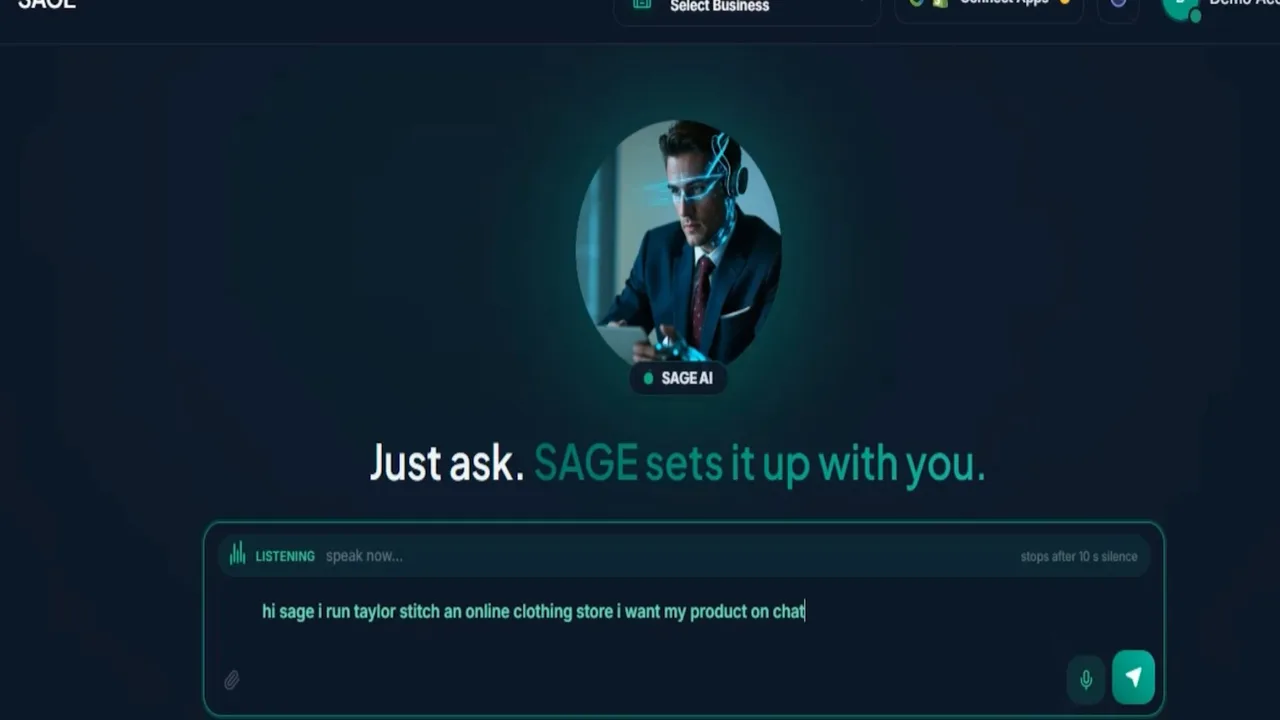
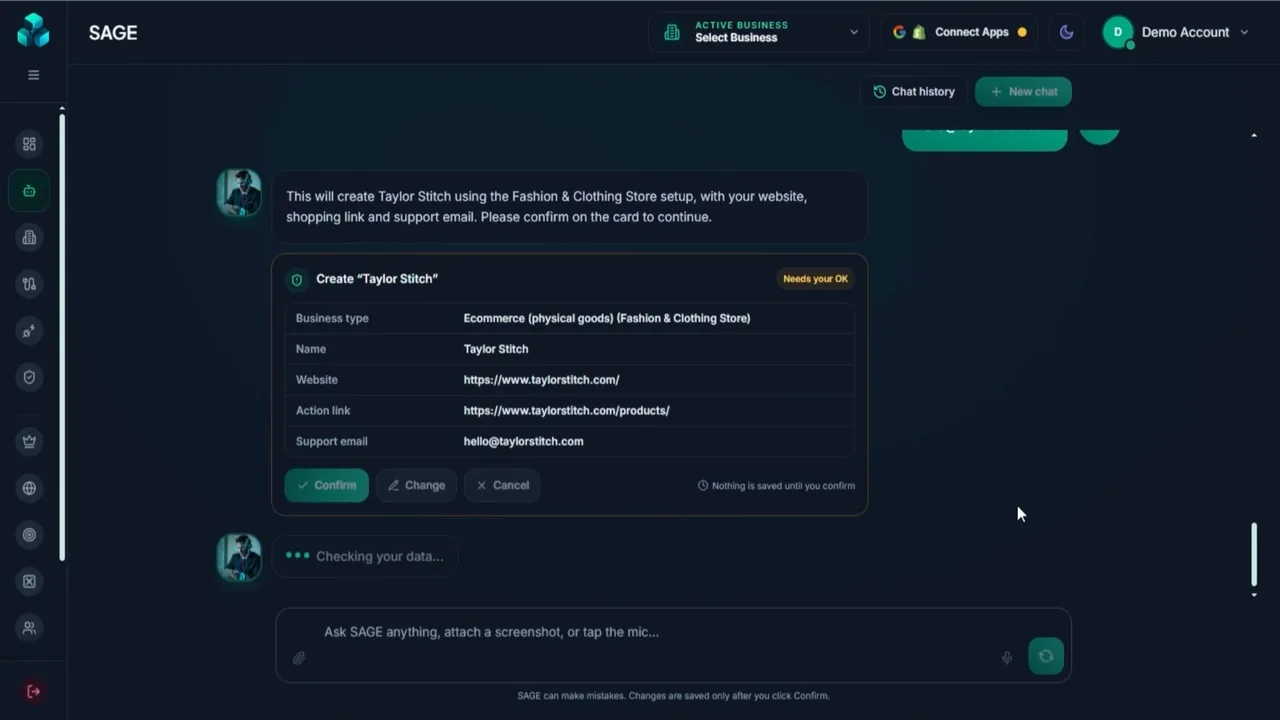
Step 1: "Just ask. SAGE sets it up with you." - Confirm the business card. SAGE picks a template (here, Ecommerce → Fashion & Clothing Store) and shows a summary card with the name, website, action link and support email. Nothing is saved until you click Confirm, which is a sensible guard against the assistant guessing wrong.
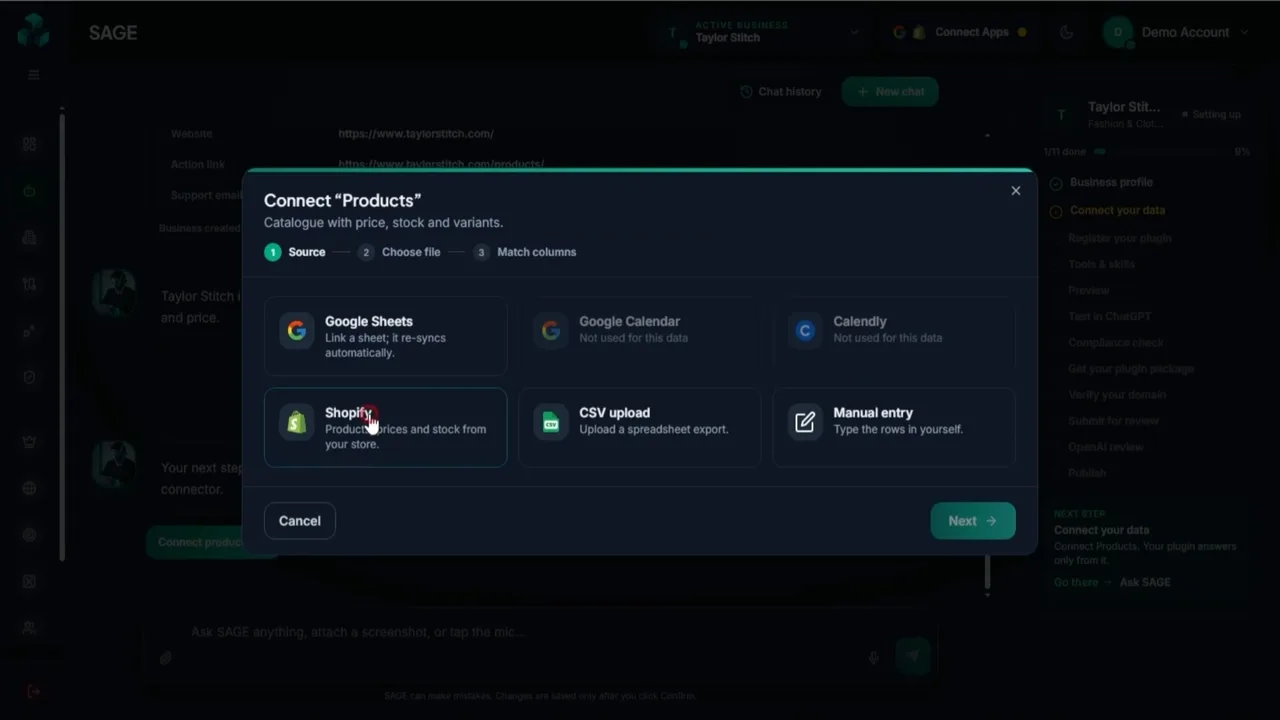
Step 2: "Nothing is saved until you confirm" - Connect the data. Pick a source: Google Sheets (re-syncs automatically), Google Calendar, Calendly, Shopify, CSV upload or manual entry. Sources that don't fit the data type are greyed out. The partner documents list Shopify and Calendly as Pro Unlimited connectors, so check which ones your plan includes.
Step 3: choosing where the plugin's answers come from - Preview and import. For the store, BizInGPT showed a live preview of products with prices and stock, an "only in-stock products" filter and a keyword filter, then imported 100 products. It states plainly that it only reads public data: it never sees orders, customers or payments.

Step 4: "Public data only", then Save & import - Review the tools. These are the actions ChatGPT can take with the plugin: check stock and sizes, compare products, get business information, list categories and so on. In the demo all seven were read-only, and each shows which data it reads and which card it displays. You can switch any of them off.
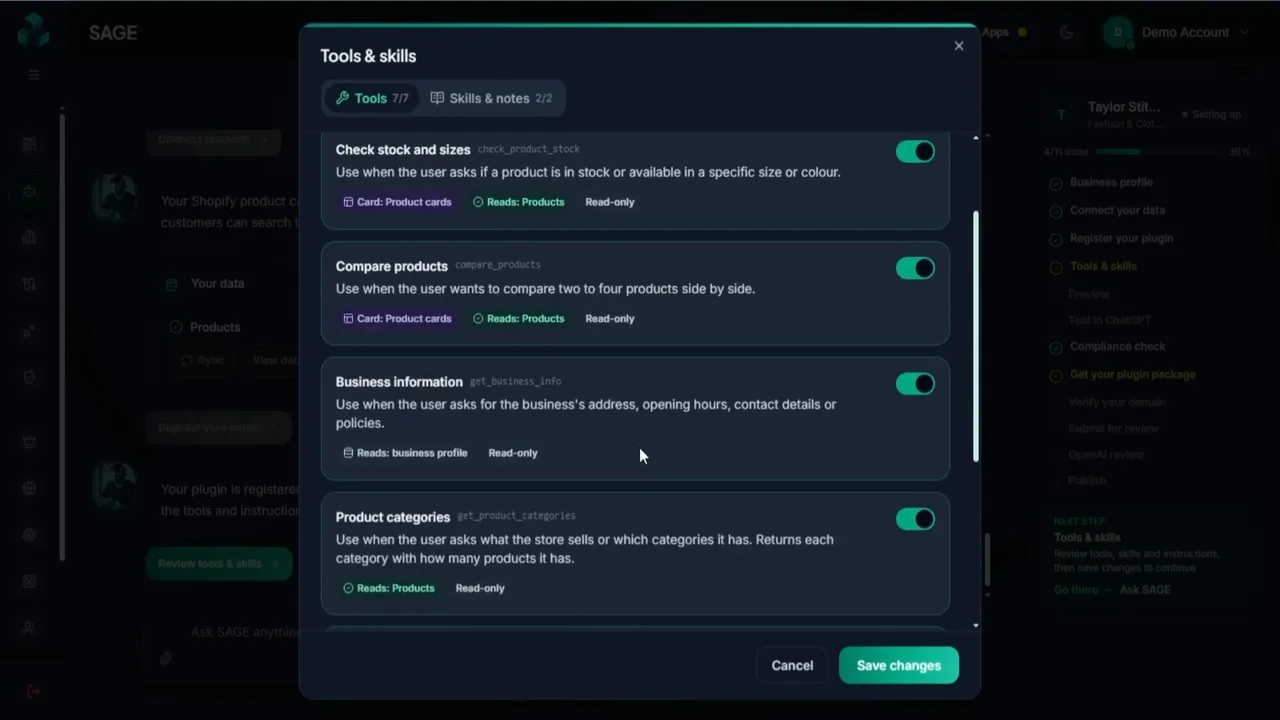
Step 5: every tool is labelled with what it reads, and they're read-only - Preview it. A built-in preview mimics ChatGPT, so you can ask "Show me the catalogue" and see which tool was used and what came back, before going near ChatGPT itself.
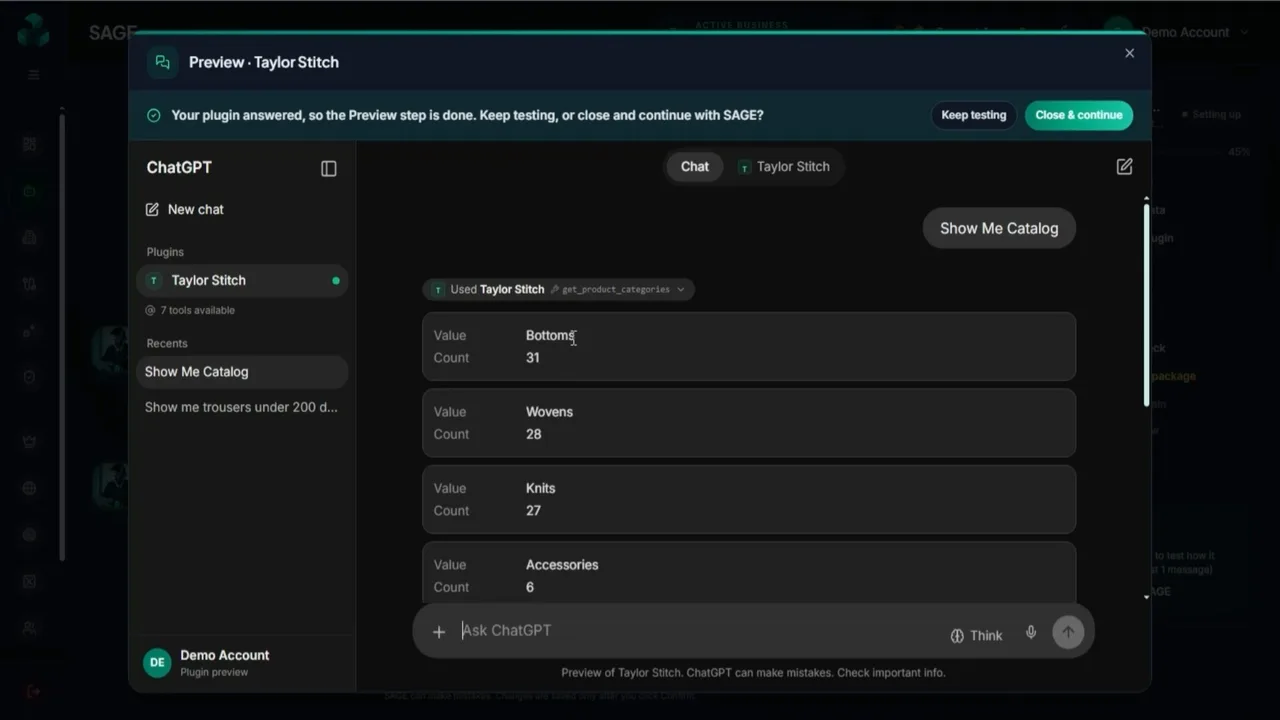
Step 6: the preview shows which tool answered - Test it in your own ChatGPT. BizInGPT gives you a private plugin URL and four steps: in ChatGPT, open Plugins, add a custom MCP server (developer mode must be on), paste the URL, choose no authentication, then mention the plugin with @ in a chat. It warns you to keep the URL private, because anyone with it can use the plugin, and it updates by itself once ChatGPT makes its first call.

Step 7: no review needed for this private test; only you can see it - See the result inside ChatGPT. Asked for trousers under $200, ChatGPT showed product cards with names, prices, sizes, stock status and Buy now buttons pointing at the store's own site. This is the moment to show a business owner.
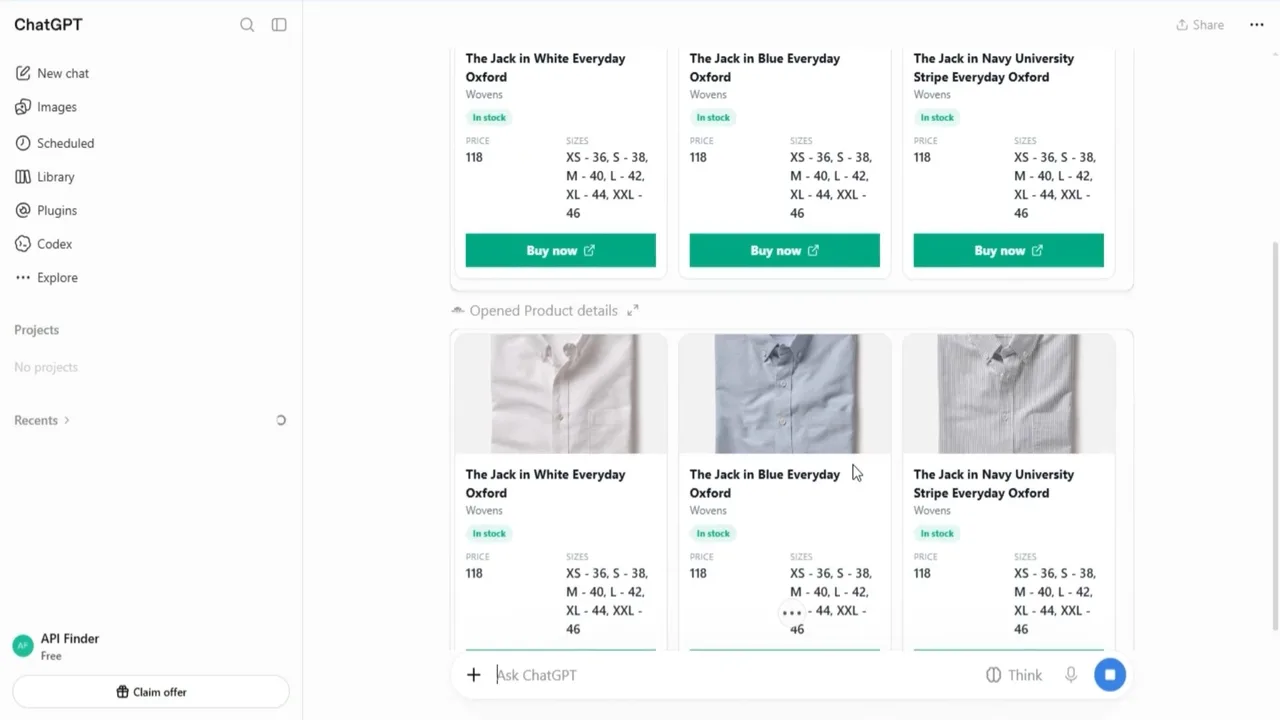
Step 8: real products, prices and sizes as cards in ChatGPT - Run the compliance check. BizInGPT checks the plugin against OpenAI's plugin rules. The demo plugin scored 100% with 21 of 22 rules passed. The one open item was a tip: submit from your own verified OpenAI account, and be ready to verify the plugin's domain.

Step 9: compliance check before submission - Download the package and submit. A three-part wizard fills in the listing (name, subtitle, description, category, links), the test cases, then produces a ZIP with step-by-step instructions for the OpenAI Platform: upload the plugin, connect the server, paste 5 positive and 3 negative test cases, submit for review and wait for the email. BizInGPT hosts the privacy, terms and support pages for you.
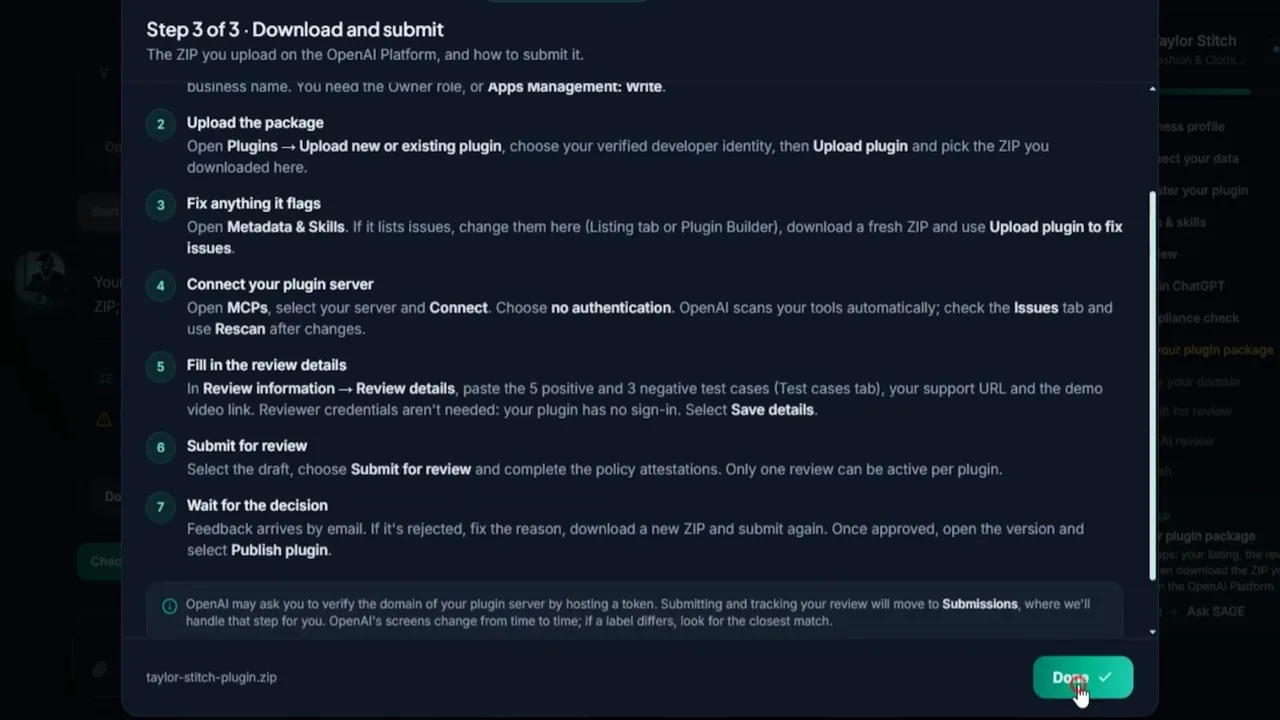
Step 10: the submission package and the OpenAI steps, written out - Track it on the dashboard. Each business gets a readiness score, data connectors, tools and ChatGPT calls, and compliance health, with activity charts. You mark the plugin as submitted, and its review history lives under Submissions.
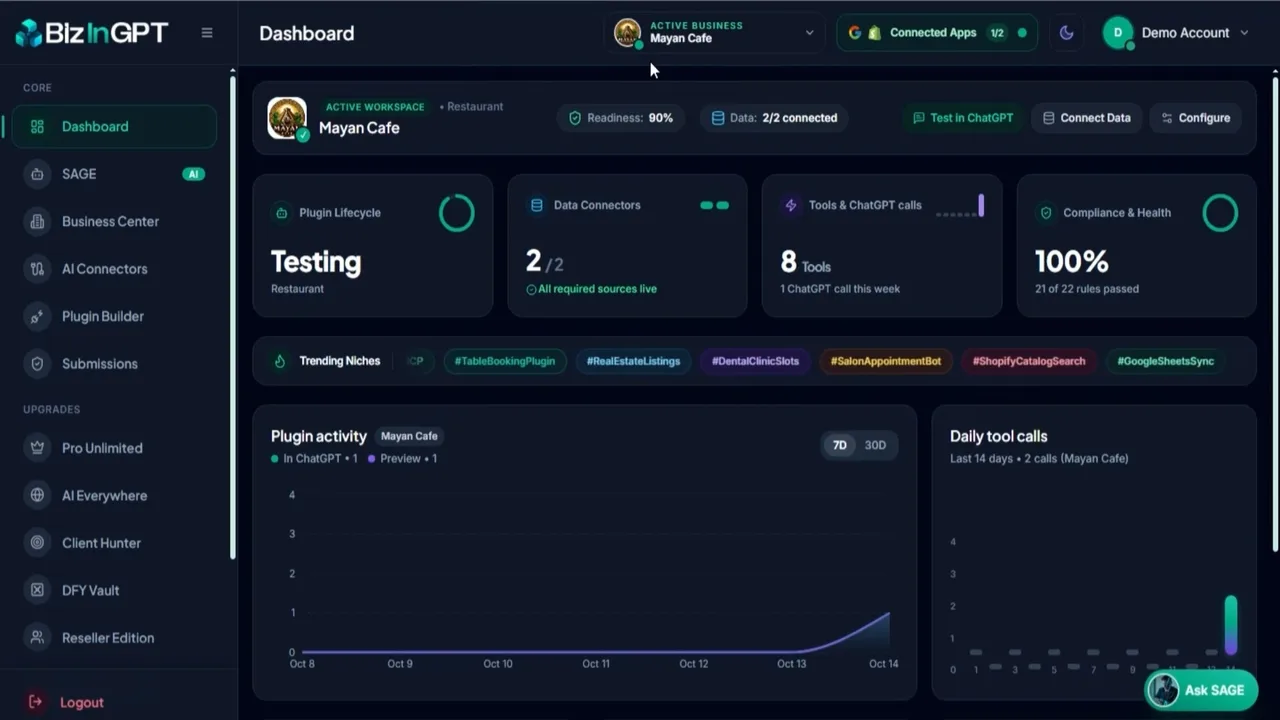
Step 11: one dashboard per business - For bookings: connect a calendar. The restaurant example reads a Google Calendar of bookings and shows free table slots for the next 14 days, so ChatGPT can answer "is there a table for 4 tomorrow at 8pm?" with real availability. It shows free slots; the customer still books on the restaurant's own system.

Step 12: free slots from a Google Calendar
Before Step 3, get the data into shape. My Bonus #4 gives you ready-to-fill Google Sheets templates for eight niches and checks a filled sheet for gaps, and Bonus #15 scans it for customer details that should never go into a plugin.
What Stood Out in the Demo
This is the part a sales page won't give you. Here's what I took from going through the demo and the documentation, area by area.
| Area | What I found |
|---|---|
| SAGE assistant | Fast, and it asks before it acts. A one-sentence voice description became a confirmed business profile in a few exchanges. The "Needs your OK" card is the right design for an AI that's about to create something on your behalf |
| Data connection | The best part of the product. A live preview before import, filters for in-stock items, and a clear "public data only" statement. Google Sheets re-syncing means a client can update prices without calling you |
| Tools & safety | Read-only by default. Every tool says which data it reads. Nothing in the demo could place an order or take a payment inside ChatGPT, which keeps the risk low for a local business |
| ChatGPT test | Works, but it's a developer step. You turn on developer mode and add a custom MCP server, and ChatGPT shows a risk warning when you do. Fine for you; I wouldn't ask a business owner to do it. Show them on your own account |
| Compliance & submission | Saves the most time. The rules check, listing fields with character counts, test cases, hosted policy pages and written OpenAI steps are the parts people usually get stuck on |
| Approval | Out of your hands. The business submits from its own verified OpenAI account (Owner role or app-management permission), only one review can be active per plugin, and OpenAI emails the decision. BizInGPT says plainly that it can't guarantee approval |
| Dashboard | Enough to report to a client. Readiness, data health, tool calls and compliance for each business. Tool calls are useful proof of activity for a monthly report |
| Demo examples | Real-looking, so be careful. The store example uses a real clothing brand's public website and catalogue. There's nothing to suggest that brand is a BizInGPT customer, so don't present it to prospects as one |
BizInGPT Features
| Feature | Where it is | My take |
|---|---|---|
| SAGE AI assistant + manual builder | Front-end | Set up by chat or voice, or use the template-and-form Plugin Builder if you prefer clicking. |
| Up to 10 live plugins, 6 launch templates | Front-end | Restaurant, Real Estate, Ecommerce, Home Services, Salon & Spa, Gym/Studio. |
| Data connectors | Front-end | Google Sheets (auto-sync), Google Calendar, CSV and manual entry, per the partner documents. |
| Hosting + monitoring | Front-end | A hosted endpoint per plugin, an instant test link, and uptime and error monitoring. |
| Compliance checker + submission pack | Front-end | Auto-fixes, generated privacy, terms and support pages, listing, test cases and a step-by-step submit guide, plus a review status tracker. |
| Readiness audit + commercial licence | Front-end | A basic ChatGPT readiness audit to show prospects, and the right to build plugins for clients. |
| Unlimited plugins, 50 templates, premium connectors | Pro Unlimited ($97) | Shopify, Airtable, Calendly and Notion; multi-language and multi-location; lead capture with email and WhatsApp alerts; analytics; policy-change alerts. Hosting is "fair use". |
| Website widget, messaging assistants, Claude connectors | AI Everywhere ($67) | The same assistant on a website and in messaging apps, plus one-click Claude connectors. |
| Find and pitch local businesses | Client Hunter ($67) | Finds businesses by niche and city, runs bulk readiness audits, writes pitches and follow-ups, and tracks a pipeline. |
| Extra templates + pitch kit | DFY Vault ($67) | 50+ more niche templates, pitch scripts, proposal and pricing templates, monthly template packs. |
| Client sub-accounts, Stripe billing, reseller rights | Agency + Reseller ($197) | Up to 50 client sub-accounts, a client portal, branded reports and resale of up to 100 accounts. |
BizInGPT Limits & Fine Print
These are the things I'd want answered before paying, with what the vendor's own pages say.
| Question | Answer |
|---|---|
| Will OpenAI approve the plugin? | Not guaranteed. OpenAI reviews every plugin and makes the final decision. BizInGPT's compliance check improves your odds; it can't promise the result. |
| Who submits it? | The business, from its own verified OpenAI account. OpenAI may also ask to verify the plugin's domain. Plan for this when you onboard a client (my Bonus #11 lists everything to ask for). |
| Can I show it to a client before approval? | Yes, through the private test link in your own ChatGPT with developer mode on. Only you can see it. |
| How many plugins? | Up to 10 on the front-end, unlimited (fair use) on Pro Unlimited. |
| Which data sources? | Front-end: Google Sheets, Google Calendar, CSV and manual entry. Shopify, Airtable, Calendly and Notion are listed under Pro Unlimited, although the sales page and demo show Shopify too. Check inside the app. |
| Can the plugin take bookings or payments? | Not in the demo. It shows real data and free slots, and sends customers to the business's own booking or checkout page. |
| Is hosting included? | Yes, according to the sales page FAQ. Pro is "fair use", and the $127 MegaBundle sells "unlimited hosting lock-in", which suggests limits exist somewhere. Ask support what happens at higher volumes. |
| One-time or subscription? | Launch purchases are one-time. The sales page says BizInGPT moves to a monthly price after launch. |
| Refund window? | 30 days, per the sales and bundle pages, subject to the vendor's refund policy. |
My advice: in your first week, build a plugin for a business you know, test it in your own ChatGPT, run the compliance check and download the package. My Bonus #1 lists the 12 claims worth checking, with your 30-day refund date counting down.
BizInGPT Pricing, OTOs & Bundle
All prices are launch prices from BizInGPT's partner documentation and bundle page. One vendor page shows the Bundle at $297 ($247 after discount); the bundle page and the JV document show $317, or $267 with BIZBUNDLE. Check the checkout before you pay.
Path 1: Front-end + upgrades
| Step | Product | Price | What it adds |
|---|---|---|---|
| Front-end | BizInGPT Commercial | $37 one-time ($33 with BIZINGPT4) | Up to 10 plugins, 6 templates, Sheets/Calendar/CSV/manual data, hosting, compliance checker, submission pack, readiness audit, commercial licence |
| Upgrade 1 | Pro Unlimited | $97 | Unlimited plugins, 50 templates, multi-language, multi-location, lead capture, Shopify/Airtable/Calendly/Notion, analytics, policy alerts |
| Upgrade 2 | AI Everywhere | $67 | Claude connectors, website chat widget, messaging assistants, one dashboard per client |
| Upgrade 3 | Client Hunter | $67 | Local business finder, bulk audits, AI pitches, follow-ups, pipeline, CSV export |
| Upgrade 4 | DFY Vault + Pitch Kit | $67 | 50+ extra niche templates, pitch scripts, proposal and pricing templates, monthly template packs |
| Upgrade 5 | Agency + Reseller | $197 | 50 client sub-accounts, client portal, branded reports, Stripe billing, resell up to 100 accounts |
| At checkout | FastPass | $230 | Offered to front-end buyers: all upgrades in one go, skipping the upsell pages |
Path 2: The Bundle
| Product | Price | What it includes |
|---|---|---|
| BizInGPT Bundle | $317, or $267 with BIZBUNDLE | Front-end plus all five upgrades, one-time, plus the vendor's bundle-only bonuses |
| MegaBundle (Bundle buyers only) | $127 | Unlimited hosting lock-in, 100 extra reseller licences (200 in total), VIP support, early access |
The maths: the front-end and all five upgrades bought separately come to $532. The Bundle with BIZBUNDLE is $267, a saving of $265. The FastPass works out the same: $37 + $230 = $267. Either way, you only come out ahead if you'd use at least Pro Unlimited plus two others, because Pro Unlimited plus one more upgrade already costs $201 on top of the front-end.
So which should you buy?
- Front-end only ($37), if you're testing the idea. Ten plugins and six templates is plenty to build demos, land a first client or two and learn the submission process.
- Front-end + Pro Unlimited ($134), if you'll work one or two niches seriously. Unlimited plugins, all 50 templates and Shopify, Calendly and the other premium connectors.
- The Bundle ($267 with BIZBUNDLE), if you're building an agency. Client finding, the website widget, the pitch kit and client sub-accounts with Stripe billing are all agency features.
My Bonus #2 takes the features you tick and works out the cheapest path, including FastPass.
BizInGPT vs Building It Yourself or a Website Chatbot
There's no direct like-for-like tool to compare it with, so here are the two other ways to get a business's information in front of AI-assisted customers.
| Task | BizInGPT | Build a plugin yourself | Website chatbot |
|---|---|---|---|
| Shows up inside ChatGPT | ✔ Once OpenAI approves it | ✔ Once OpenAI approves it | No, only on the website |
| Code needed | None | Server, tools and hosting | Usually none |
| Live data (sheet, calendar, store) | ✔ Built-in connectors | You write the connections | Varies |
| Compliance check + submission files | ✔ Generated | Done by hand | Not applicable |
| Hosting | BizInGPT's servers | Yours | The chatbot vendor's |
| Cost to start | $37 one-time | Developer time + hosting | Usually monthly |
A developer building it by hand gets full control and no dependency on a third-party host. Where BizInGPT wins is speed and the paperwork: for a non-developer, it turns a technical project into a 12-step checklist.
BizInGPT Score Breakdown
How I scored BizInGPT
BizInGPT Red Flags
None of these stop me recommending the front-end. They're the things I'd want to know before paying.
⚠ Pricing and details
- Two Bundle prices. One vendor page says $297 ($247 after discount); the bundle page and JV document say $317, or $267 with BIZBUNDLE. Trust the checkout.
- Connector confusion. The partner documents put Shopify and Calendly under Pro Unlimited, but the sales page and demo show Shopify. Check what your plan includes before promising a store owner.
- Placeholder text on the pre-launch sales page. The preview I read had unfilled fields, including the refund conditions, the bonus value and testimonial slots labelled "verified user". These may be fixed at launch, but don't rely on testimonials you can't verify.
- An unexplained $9.98 add-on ("Premium AI Features") appears on the sales page without saying what it includes.
⚠ Things that are outside your control
- OpenAI decides. Approval, the review timeline and the plugin rules all belong to OpenAI, and they can change. BizInGPT's Policy Watch (a Pro feature) tracks rule changes, but nothing can guarantee a listing.
- Hosting dependency. Your clients' plugins run on BizInGPT's servers. If the service changed its terms or closed, those plugins would stop. Factor that into what you promise clients.
- Results aren't promised. Being in ChatGPT doesn't guarantee a business more customers, and the vendor says so. Sell accuracy and convenience, not traffic.
✔ Why I'm still comfortable recommending it
- It solves the hardest part, the technical build and submission, without code
- Read-only tools and public data only keep the risk low for local businesses
- The vendor is upfront that it isn't OpenAI and can't guarantee approval or customers
- A one-time front-end with a commercial licence and a 30-day guarantee
Who Should Buy BizInGPT?
✔ Good fit
- Freelancers and agencies selling services to local businesses
- Web designers who want a new add-on to sell existing clients
- Store owners who want their own catalogue in ChatGPT
- Marketers comfortable explaining a new idea to owners face to face
✘ Poor fit
- Anyone expecting guaranteed approvals or new customers
- People who won't contact or onboard businesses
- Developers who'd rather host and control their own plugin server
- Businesses with no organised data to connect
BizInGPT Bonuses: 15 Custom-Built Tools
I built all 15 around the parts of the BizInGPT workflow where people get stuck: getting clean, safe data, writing the listing and test cases for submission, pricing and pitching the service honestly, onboarding clients, and keeping plugins accurate month after month. Every one is a working browser tool, not an ebook. They run on desktop or phone, and nothing you type leaves your device.
How to claim my bonuses
- Buy BizInGPT (the front-end or the Bundle) through my link. Clear your cookies first, or use a private window.
- Forward your JVZoo receipt to kbimal@thestacklens.com with the subject "BizInGPT Bonuses".
- You'll get access to all 15 tools within 24 hours.
BizInGPT FAQ
What is BizInGPT?
BizInGPT is a no-code web app that builds, hosts and prepares ChatGPT plugins for local businesses and online stores. A plugin lets ChatGPT answer customers from the business's own data, such as its menu, products, prices, hours and free booking slots, and link them to book or buy. BizInGPT isn't made by or affiliated with OpenAI.
Is there a BizInGPT coupon code?
Yes. The vendor's partner documents list BIZBUNDLE for $50 off the Bundle ($317 down to $267) and BIZINGPT4 for $4 off the $37 front-end. If a code doesn't apply, the price shown at checkout is the one that counts.
How much does BizInGPT cost?
The front-end is $37 one-time during launch. The upgrades are Pro Unlimited ($97), AI Everywhere ($67), Client Hunter ($67), DFY Vault + Pitch Kit ($67) and Agency + Reseller ($197). The Bundle is $317, or $267 with BIZBUNDLE, and FastPass is $230 at front-end checkout. The sales page says the price moves to monthly after launch.
What are the BizInGPT OTOs?
OTO 1 is Pro Unlimited, OTO 2 is AI Everywhere, OTO 3 is Client Hunter, OTO 4 is DFY Vault + Pitch Kit and OTO 5 is Agency + Reseller. Bundle buyers are also offered the $127 MegaBundle.
Is the BizInGPT Bundle worth it?
If you'll use Pro Unlimited plus at least two other upgrades, yes: the front-end and all five upgrades cost $532 separately, and the Bundle is $267 with BIZBUNDLE. If you only want to build a few plugins, the $37 front-end is the better buy.
Does BizInGPT guarantee OpenAI approval?
No. OpenAI reviews every plugin and makes the final decision. BizInGPT runs a compliance check against OpenAI's plugin rules and prepares the submission package, which helps, but it says clearly that nobody can guarantee approval.
Who submits the plugin to OpenAI?
The business does, from its own verified OpenAI account. BizInGPT's instructions say you need the Owner role or app-management permission, and OpenAI may ask to verify the plugin's domain. BizInGPT hosts the plugin.
Can I test a plugin before it's approved?
Yes. BizInGPT gives you a private plugin URL to add in your own ChatGPT as a custom MCP server with developer mode turned on. Only you can see it, so it's a good way to demo a plugin to a business owner.
Do I need to code?
No. You can set up a plugin by talking to the SAGE assistant or by using the template-and-form Plugin Builder. You'll still need to manage the business's data, usually in a Google Sheet.
What is the BizInGPT refund policy?
The sales and bundle pages offer a 30-day money-back guarantee: contact support within 30 days, subject to the vendor's refund policy. Support is at bizingpt.com/support.
Is BizInGPT legit?
It's a real product launching on JVZoo with a 30-day guarantee, and the demo shows a complete working flow from data to a submission package. The brand is new, so there's no long track record, and some pre-launch pages still had placeholder text. Build a test plugin in your first week to judge it for yourself.
Is BizInGPT a one-time payment?
During launch, yes: the front-end, every upgrade and the Bundle are one-time purchases. The sales page says the product moves to a monthly price after launch.
BizInGPT Video Review
Prefer to watch? In this video I go through BizInGPT step by step: SAGE, connecting data, the tools, testing inside ChatGPT, the compliance check, the submission package, every upgrade, the Bundle and my 15 bonuses.
What I cover in the video:
- Setting up a business with SAGE
- Connecting data and choosing tools
- Testing a plugin inside ChatGPT
- The compliance check and submission package
- Pricing, upgrades, coupons and the Bundle
- Red flags, my 15 bonuses and my verdict
Final Verdict: Is BizInGPT Worth It?
Yes, the front-end is worth it if you're prepared to sell a new kind of service to local businesses. What sets BizInGPT apart is that it handles the parts a non-developer can't: the server, the tools, the rules check, the hosted policy pages and the submission paperwork. In the demo, a one-sentence description became a working plugin showing real products inside ChatGPT, with a ready-to-submit package at the end.
It isn't a money machine, and it can't make OpenAI say yes. Every business has to submit from its own verified account, approval and timing belong to OpenAI, and your clients' plugins live on BizInGPT's hosting. Sell accuracy and convenience, not traffic, and you'll keep your clients' trust.
My recommendation: buy the front-end at $37 (or $33 with BIZINGPT4) while it's a one-time price. Build a plugin for a business you know in week one, test it in your own ChatGPT and download the package. Add Pro Unlimited once you're past ten plugins or need Shopify or Calendly. Take the Bundle with BIZBUNDLE if you're building an agency and will use the client-finding, widget and sub-account features.

K. Bimal runs TheStackLens and reviews AI tools, SaaS and digital marketing software for founders, agencies and side-income builders. He tests tools hands-on where he can get access, and checks prices and claims against the vendor's own listings and fine print before scoring them.