
Explaindio 5 AI Review: What the Demo Shows, the Real Price of Each Upgrade, and Who It's Actually For
Explaindio 5 AI is a web app that finds local businesses with no video on their website, makes each one a short sample video, drafts the email you send with it, and lets the owner pay on the video page to get the full version. The front-end launches on JVZoo on October 20, 2026, starting at $27 one-time and rising to $47 as sales come in. I rate it 7.9/10. The find-to-pitch workflow is the most complete I've seen in a launch tool, and the limits are published rather than hidden. The catches: credits run out faster than the headline suggests, you still write and send every email yourself, and the Bundle ($197 to $297) is billed every year.
Disclosure: This review contains affiliate links. If you buy through them, I may earn a fee at no extra cost to you, and I offer my own bonuses on this page. How I reviewed it: I went through Explaindio's review kit (the full product walkthrough and a finished-video capture), the sample videos, the sales page, every upgrade page and the vendor's partner documentation. I didn't have a review login, so I haven't run my own searches yet, and I say so wherever it matters. The businesses in the screenshots are fictional examples made by the vendor. Nothing here is a promise of income.
TheStackLens score
Explaindio 5 AI Review: Quick Verdict
Most "make videos for local businesses" launches give you a video editor and leave the hard part to you: finding businesses that need a video, and getting them to look at it. Explaindio 5 AI does the hard part first. It searches a business type in a city, checks each website, makes a watermarked sample, writes the email and logs who you contacted. For $27 to $47 one-time with 800 credits, that's good value if you'll actually do the outreach. Buy the front-end if you want to try local video outreach. Take the Bundle only if you'd use Agency and Done-For-You Leads, because it renews every year.
✔ What I like
- Covers the whole job: find, check, sample, email, payment, delivery
- The website check gives you a reason to reach out beyond "you need a video"
- Limits are published: searches, credits, video length, workspaces
- Owners pay on the video page and the full video unlocks without you chasing invoices
- Free local rendering with the optional desktop app
- Default emails include an opt-out line and your address
✘ What I don't like
- Credit estimates don't line up: 800 for "60+" samples, 2,100 for "about 300"
- The Bundle is billed yearly; its contents stop when you stop paying
- You read and send every email yourself (by design, but it's real work)
- Thinner results outside six countries; extra map results need your own paid key
- Talking presenter is tiny: 100 credits is about 20 seconds
- Billing for Pro Lite and Agency Lite isn't stated in the partner notes
Explaindio 5 AI Coupon Code & Bundle Deal
NO CODENo coupon code has been announced. Instead, the launch uses a rising price: the front-end starts at $27 and goes up 10 cents every 10 sales (to a $47 cap), and the Bundle starts at $197 and goes up $10 every 10 sales (to $297). Buying early is the only discount.Front-End ★ Start here
- Business finder, 50 per search
- Website checks + contact finder
- 800 credits, email writer, outreach log
- Payment page + full Explaindio studio
Bundle (yearly)
- Front-end + bump + all 5 upgrades
- +800 credits every month
- Explaindio Video Creator (classic)
- Active only while you renew
Bought Separately
- Includes $564 a year of Done-For-You Leads
- Without DFY Leads: $455
- One-time parts stay yours
What Is Explaindio 5 AI?
Walk down any high street and most of the businesses have a website with no video on it. A plumber, a dentist, a roofer: the site has a phone number, a list of services and a stock photo. The owner knows video would help. They just never get round to it.
That gap is what Explaindio 5 AI is built around. You pick a business type and a city, and it returns local businesses with a website, flags the ones with no video, and checks a handful of other things on each site. For any business you choose, it reads their website and builds a short sample video about them. You send the owner a link to a watermarked sample page with an email it drafts for you. If the owner wants the full video, they pay on that page and it unlocks, without the "sample" label.
Explaindio itself isn't new. The company says it has been making animated videos for more than ten years, and Explaindio 5 AI keeps the full editing studio (the sales page lists over 750 video templates and over 750 animated templates). What's new is everything around the editor: the business finder, the website checks, the outreach tools and the payment page.
The launch runs on JVZoo. There's a free session on Tuesday, October 20, 2026 at 10:00 AM ET, and the cart opens at 11:00 AM ET the same day. Launch week ends Saturday, October 24, but the vendor says the offer stays open after that. The front-end price rises with sales, so it won't stay at $27.
How Explaindio 5 AI Works: The Full Flow, Step by Step
The review kit includes a walkthrough of one complete run, using a fictional plumbing business. Here's each step, with screenshots from that walkthrough.
- Search a business type in a city. Pick a type of business and a city and click "Find businesses". In the demo, a search for dentists in Austin, TX returned 161 businesses, 42 of them with no video on their site. Each row shows quick tags like "No video on site", "No chat on site" or "No online booking", plus Save and Open buttons. The front-end returns up to 50 businesses per search.
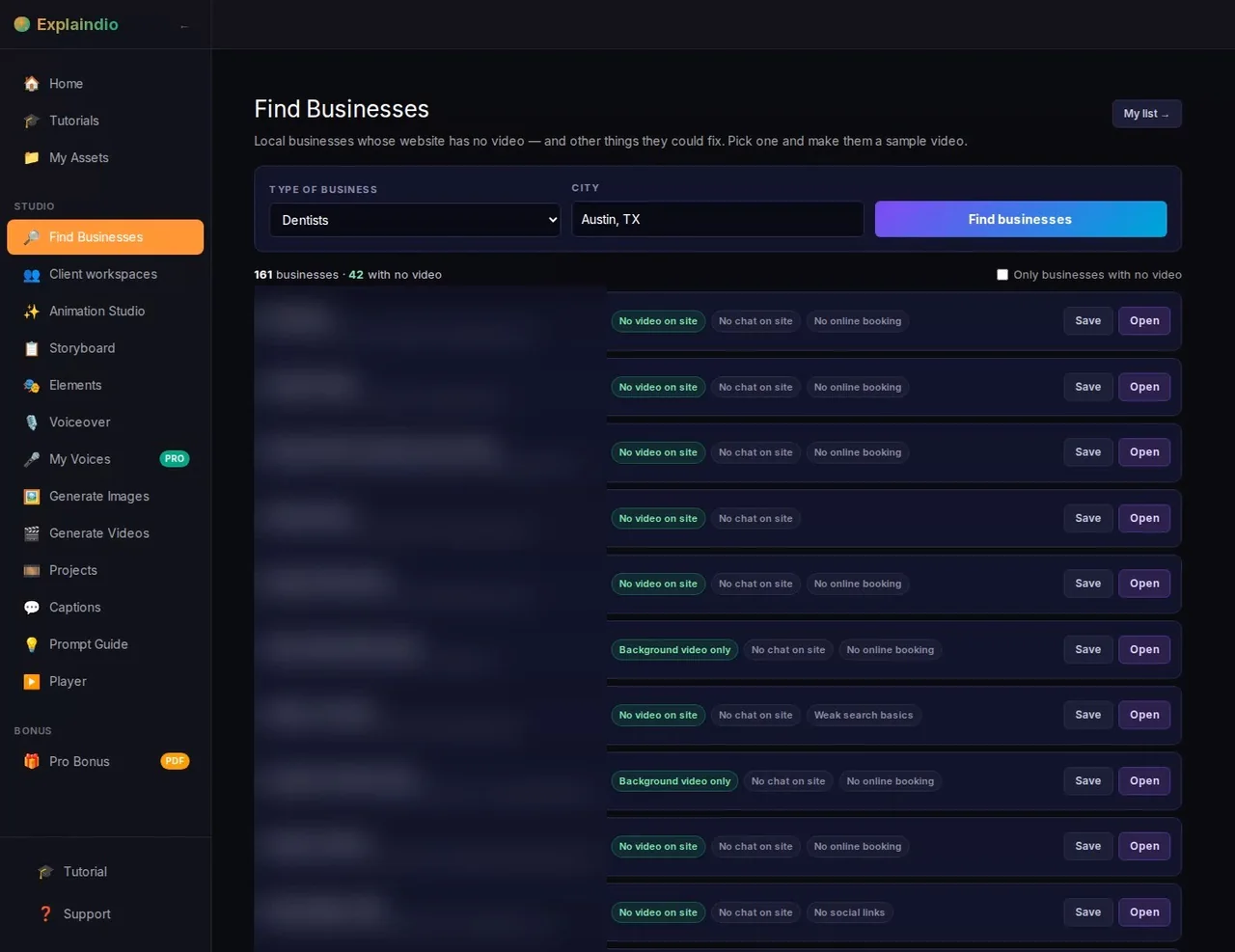
Step 1: the business finder, with a tag for each website issue - Read the website check. Open a business and you get a short report: whether there's a video, whether the site is secure (HTTPS), and whether it has chat, social links, search basics, online booking and a contact form. It also tells you what already looks fine, which is useful so you don't pitch fixes they've already made.
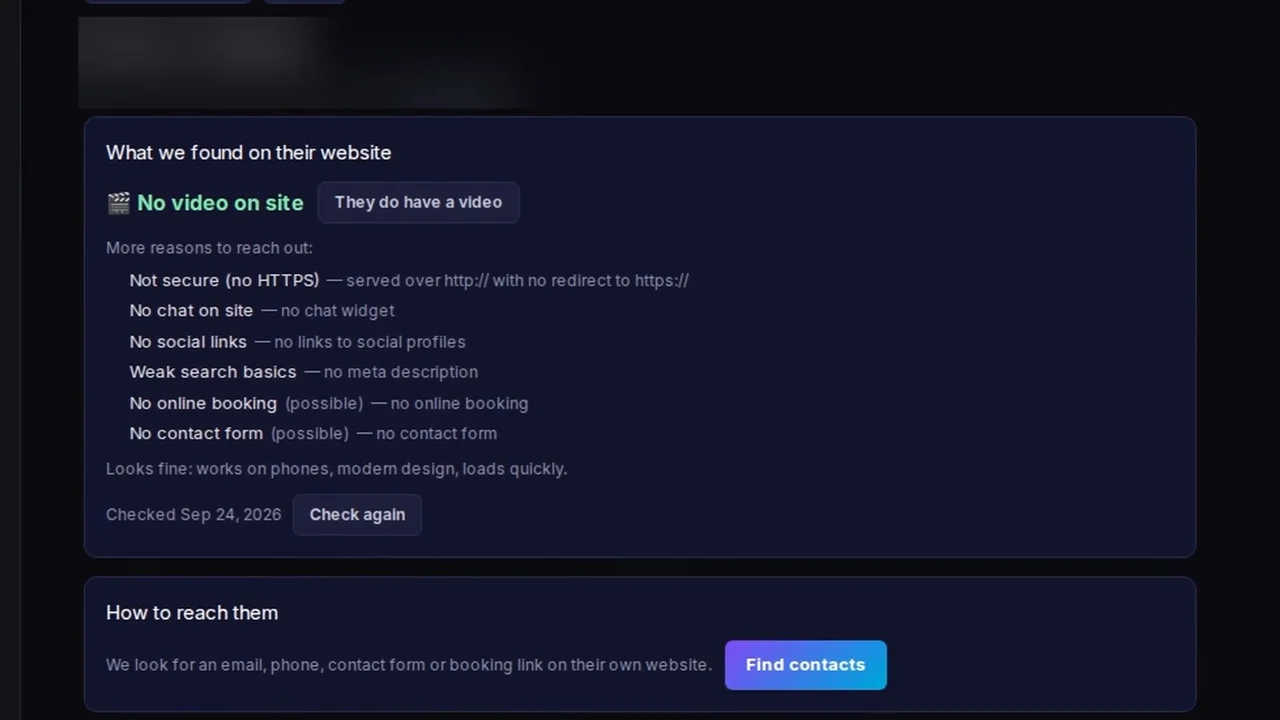
Step 2: "What we found on their website", with more reasons to reach out - Find contacts and create the sample. "Find contacts" looks for an email, phone number, contact form or booking link on the business's own website. Then you choose a format (16:9 for a website, or vertical) and click "Create sample video". The app reads their site and writes a short explainer about the business.
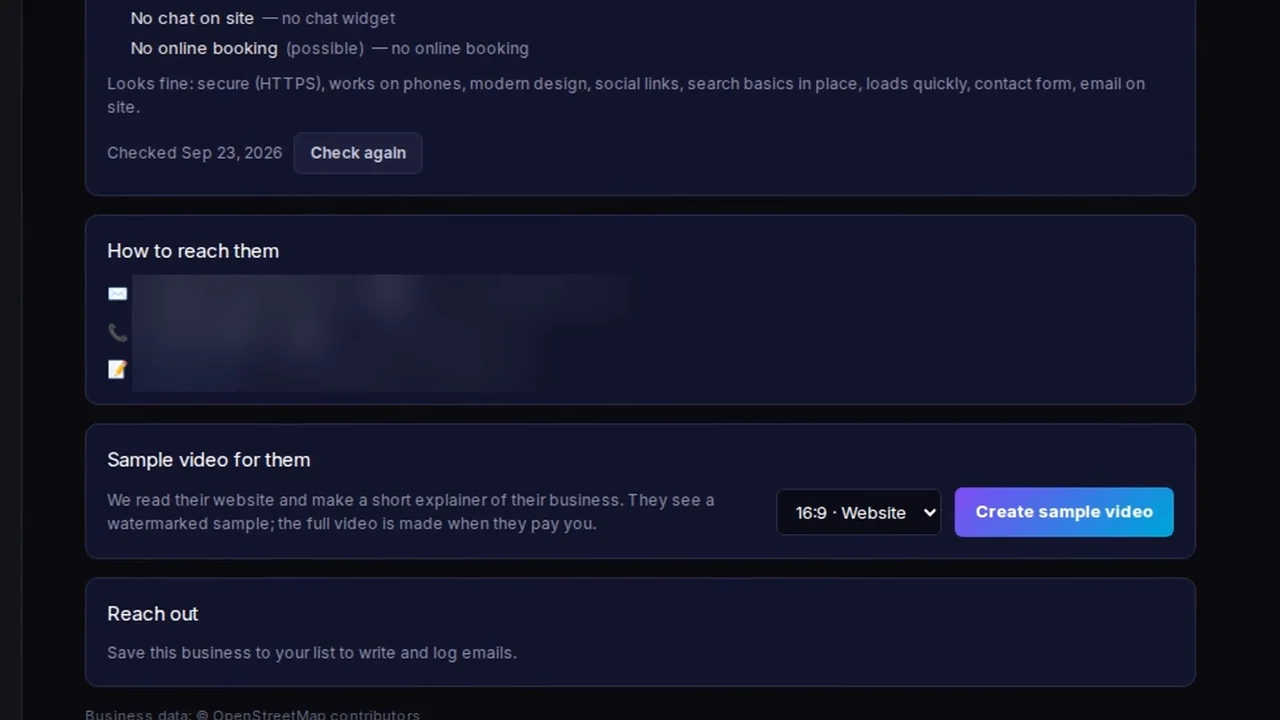
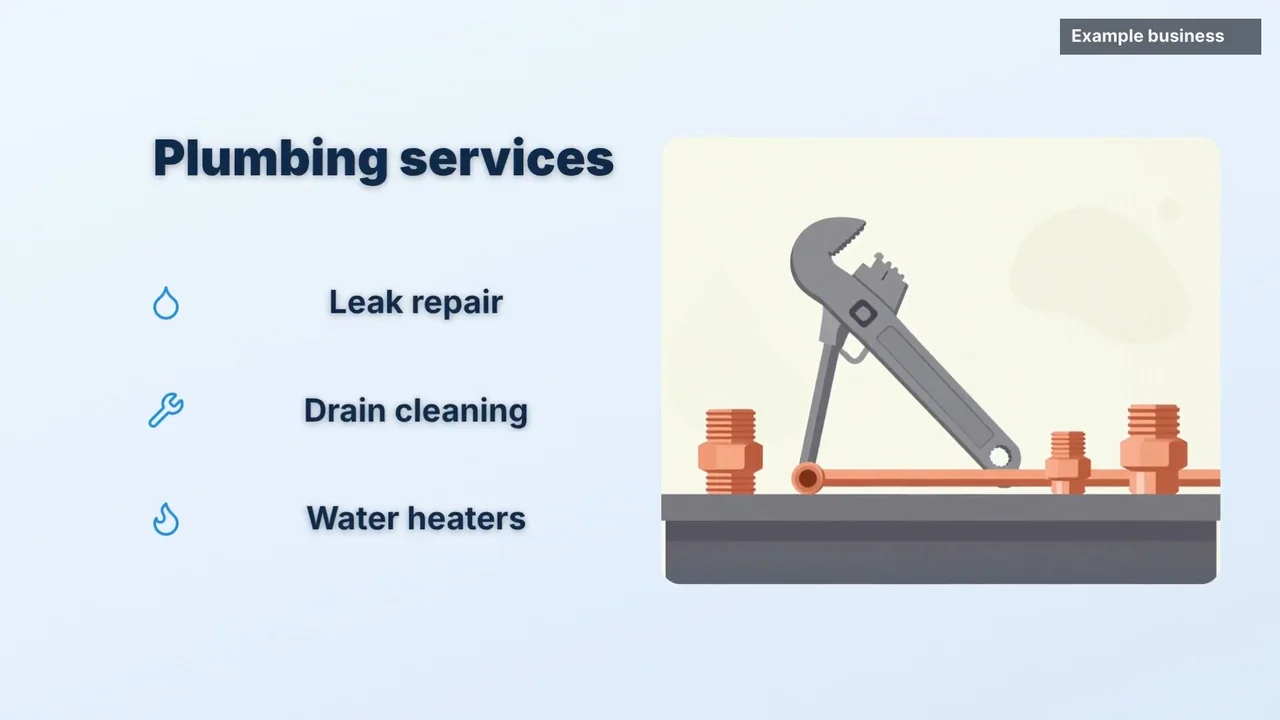
Step 3: contacts found, format picked, sample ready to create - Wait for the render. The sales page says sample renders take a few minutes. The demo's finished sample ran 36 seconds, opening on the business name with a plumbing scene. You can download the MP4 for your own records, but the owner only sees the watermarked version.
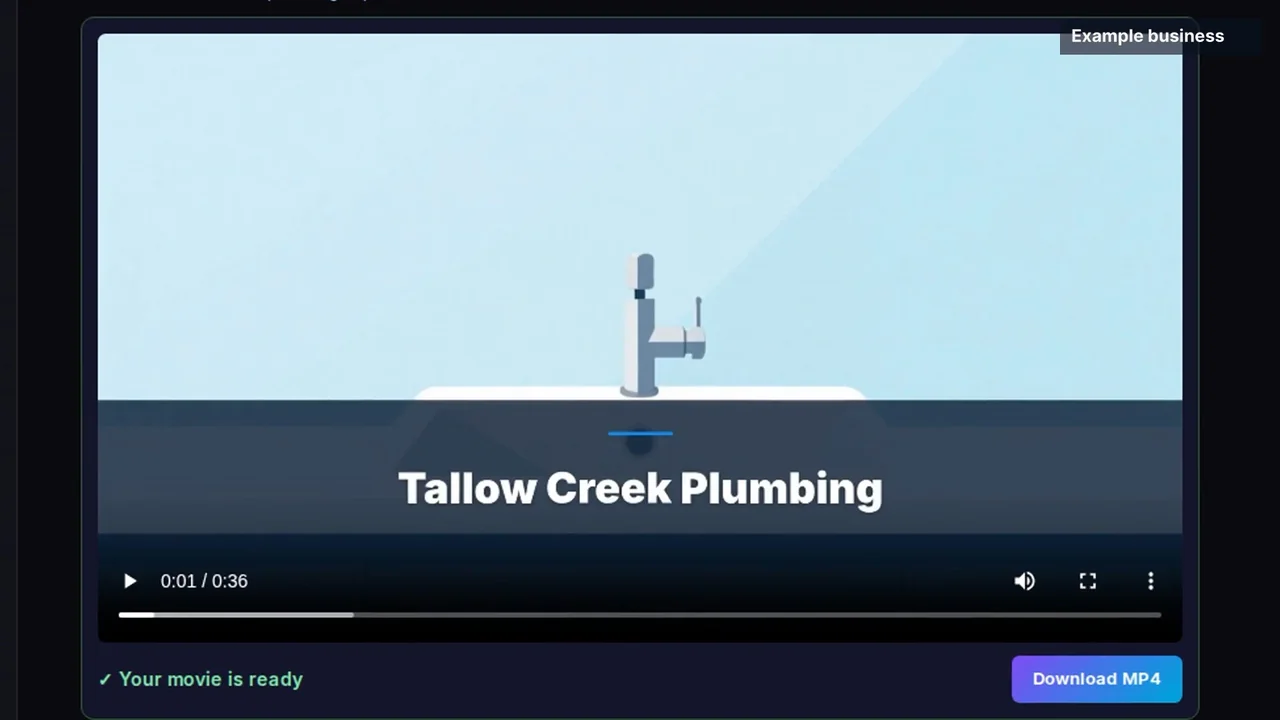
Step 4: "Your movie is ready", a 36-second sample - Share the sample page. Each sample gets its own page with the business name in the headline, the video stamped "SAMPLE", your business name and email, and a button to talk to you about the full video. There's an opt-out link at the bottom. The sales page says sample videos can't be downloaded from this page.

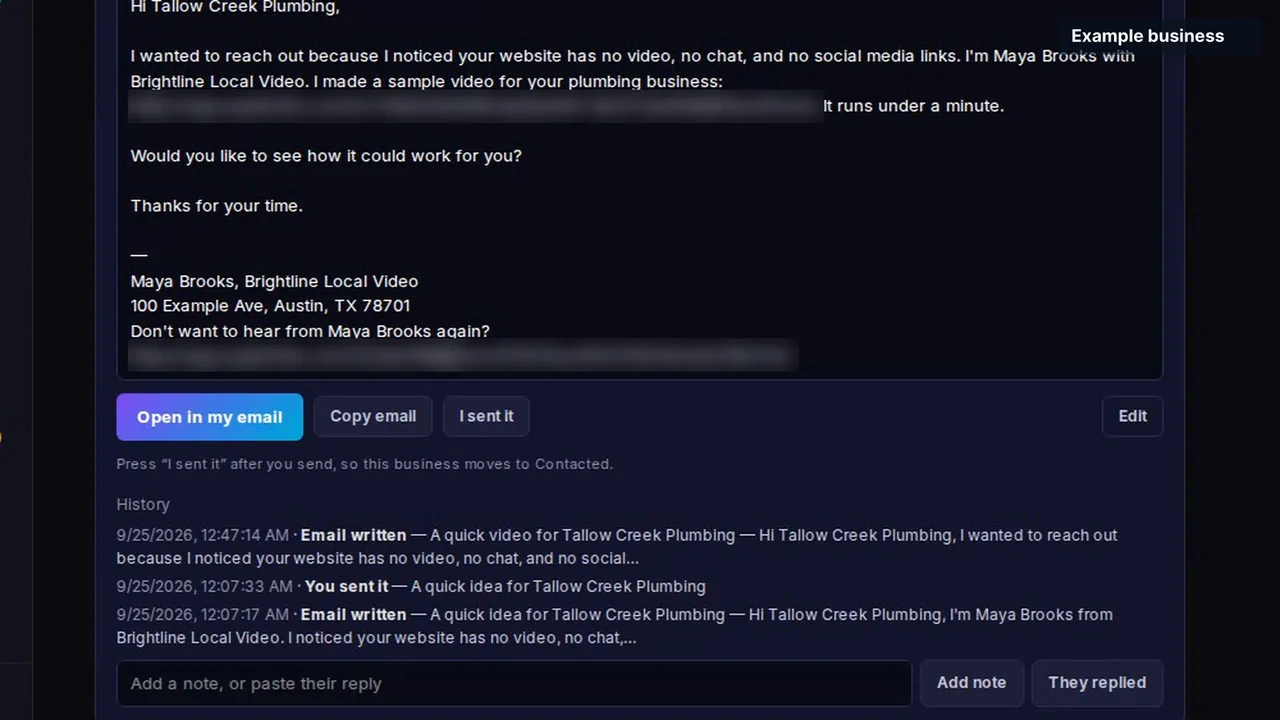
Step 5: what the business owner sees - Send the email and log it. The email writer drafts a short, plain message: why you're writing, that you made a sample, a link, and a question. It signs off with your name, address and an opt-out line. You click "Open in my email" or "Copy email", send it yourself, then press "I sent it" so the business moves to Contacted. The history keeps every email written and sent, and there's a "They replied" button and space for notes.
Step 6: the drafted email, the send buttons and the outreach history - Get paid and deliver. If the owner wants the full video, they pay on the video page, through Stripe or your own payment link, and the full version unlocks without the sample label. You can edit the video in the studio before sending it, and the sales page says Explaindio takes no cut of what you charge.
Step 7: a frame from the finished video, with the business's services animated
Before you open Step 1, plan what you'll search. My Bonus #4 maps every business type and city combination so you don't repeat a search, and Bonus #5 ranks the results so your credits go to the best prospects first.
What Stood Out in the Review Kit
This is the part a sales page won't give you. Here's what I took from the walkthrough, the finished video and the documentation, area by area.
| Area | What I found |
|---|---|
| Business finder | Useful filtering, not just a list. The "no video" tag plus the other website tags means you can sort prospects by how much they'd gain, before you spend a single credit |
| Website check | Gives you a real conversation opener. "Your site has no HTTPS and no booking link" is a more useful email than "you need a video". It also lists what looks fine, so you don't embarrass yourself pitching a fix they've already made |
| Sample video | Clean and simple. The 36-second sample used the business name, a relevant scene and an animated list of services. It looks like a tidy explainer, not a cinematic ad. Expect to tweak the wording in the studio for anyone you really want to win |
| Outreach email | Better default than most. Short, specific, and it includes an address and an opt-out line. You still read and send each one yourself; Explaindio says this on its own sales page |
| Outreach log | A light CRM built in. Written, sent, replied and notes, per business. Enough for one person working a few niches |
| Payment and delivery | Promising, not shown end to end. The flow is described clearly (Stripe or your own link, full video unlocks after payment), but the review kit doesn't show a payment going through. Test this before a real client tries it (my Bonus #12 is a checklist for exactly that) |
| Credits | Measure your own number. 800 credits is "about 60+" samples on the front-end, but 2,100 is "about 300" on Pro. That's roughly 13 credits per sample in one place and 7 in another |
| Coverage | Strongest in six countries. The interface credits OpenStreetMap for business data. The sales page says results outside the US, Canada, UK, Ireland, Australia and New Zealand may be thinner, and extra map results need your own map key, billed by the map provider |
Explaindio 5 AI Features
| Feature | Where it is | My take |
|---|---|---|
| Business finder | Front-end | Search by business type and city, up to 50 per search. Pro raises this to 100 per search and 300 searches a month. |
| Website check + contact finder | Front-end | Flags missing video, HTTPS, chat, social links, booking and contact form, and finds contact details published on the business's own site. |
| One-click sample videos | Front-end | 800 credits included. Watermarked, shorter, non-downloadable samples. A business needs a website for a one-click sample. |
| Email writer + outreach log | Front-end | Drafts the email and tracks status. You send it from your own email. Pro adds sending from your own CRM or email tool. |
| Payment page + delivery | Front-end | Stripe in one click or your own payment link. The full video unlocks after payment. |
| Full Explaindio studio | Front-end | 750+ video templates and 750+ animated templates, per the sales page, plus free stock photos and videos that use no credits. |
| Desktop app | Front-end | Optional, free local rendering on Windows 10+ (64-bit), macOS 13 Ventura+ or 64-bit Linux. |
| Commercial license | Front-end | Make and sell videos for clients. |
| Longer videos, premium templates, mascots, voice clones | Pro ($67) / Pro Lite ($47) | Pro allows videos up to 5 minutes; Pro Lite up to 2 minutes. |
| Your logo and colours on sample pages | Agency ($297/yr) / Agency Lite ($67) | Plus client workspaces: 10 on Agency, 3 on Lite. |
| Monthly done-for-you leads | DFY Leads ($47/mo) | 2 picks a month (type and city), up to 50 businesses each. |
Explaindio 5 AI Limits & Fine Print
To Explaindio's credit, the limits are written down. Here's what they mean in practice.
| Question | Answer |
|---|---|
| How many samples can I make? | 800 credits on the front-end, which the vendor puts at "about 60+" samples. Make three, check your balance, and work out your own average (my Bonus #2 does the maths). |
| Does it send emails for me? | No. It writes them; you read and send each one. Pro can send from your own CRM or email tool. |
| Which countries work best? | The US, Canada, UK, Ireland, Australia and New Zealand. Elsewhere, results rely on free public map data and may be thinner. |
| Are there any extra costs? | Extra map results need your own map key, billed by the map provider (estimate it with Bonus #14). Payment fees come from Stripe or your payment provider. |
| Can businesses without a website get a sample? | Not in one click. The sample is built from their website. |
| Talking presenter? | Listed with Pro. The vendor's notes say 100 presenter credits come with the front-end, about 20 seconds, and tell affiliates not to promise more. |
| One-time or subscription? | Front-end, Pro, Fix-It Pack and the order bump are one-time. Agency is $297 billed yearly, DFY Leads and Pro Monthly are monthly, and the Bundle is billed yearly. |
| Refund window? | 30 days, if the product doesn't do what its sales page says. For monthly and yearly plans the 30 days run from the first payment. |
My advice: in your first week, run three real searches, make three samples and send one email to a business you'd genuinely like to work with. My Bonus #1 tracks each sales-page claim against what you see, with the 30-day refund date counting down.
Explaindio 5 AI Pricing, OTOs & Bundle
All prices are launch prices from Explaindio's partner documentation. The front-end and Bundle prices rise as they sell, so check the checkout before you pay.
Path 1: Front-end + upgrades
| Step | Product | Price | What it adds |
|---|---|---|---|
| Front-end | Explaindio 5 AI | $27–$47 one-time | Business finder (50 per search), website checks, contact finder, 800 credits, sample pages, email writer, outreach log, payment and delivery, full studio, desktop app, commercial license |
| Order bump | Niche Campaign Pack | $17 | Ready-to-send emails, follow-ups, call scripts and objection answers for 10 local business types, plus a price sheet |
| Upgrade 1 | Pro | $67 one-time | 300 searches a month, 100 per search, 2,100 more credits, 5-minute videos, premium templates, presenter, mascots, voice clones, send from your CRM |
| Upgrade 1 alt. | Pro Monthly | $37 a month | Same as Pro, with 2,100 credits every month |
| Downsell | Pro Lite | $47 | 100 searches a month, 700 more credits, 2-minute videos, premium templates, 1 mascot, 1 voice clone, send from your CRM |
| Upgrade 2 | Fix-It Pack | $47 | Step-by-step guides for common website fixes, a price sheet, proposal and contract templates |
| Upgrade 3 | Agency | $297 a year | Your logo and colours on every sample page, up to 10 client workspaces |
| Downsell | Agency Lite | $67 | Logo and colours, 3 client workspaces |
| Upgrade 4 | Done-For-You Leads | $47 a month | 2 picks a month (business type and city), up to 50 businesses with no video per pick |
Path 2: The Bundle
| Product | Price | What it includes |
|---|---|---|
| Explaindio 5 AI Bundle | $197 a year, rising to $297 | Front-end, Niche Campaign Pack, Pro, Fix-It Pack, Agency and Done-For-You Leads while the Bundle is active, 800 extra credits every month, the classic Explaindio Video Creator, and 8 Bundle-only vendor bonuses |
Here's the maths I'd want before deciding. In year one, buying the front-end, order bump, Pro, Fix-It Pack, Agency and a year of Done-For-You Leads separately comes to $1,019 at the lowest launch prices. $564 of that is the monthly leads. The Bundle at $197 covers all of it, plus 800 credits a month. That's a big difference, but there's a trade-off: everything in the Bundle runs only while you keep renewing, while one-time upgrades stay yours.
So which should you buy?
- Front-end only ($27–$47), if you're testing local video outreach. 800 credits and 50 businesses per search is enough to learn whether you'll actually send the emails.
- Front-end + Pro ($94–$114 one-time), if you'll work several niches. More searches, 100 per search, 2,100 more credits and longer videos, all with no renewal.
- The Bundle ($197–$297 a year), if you'd use Agency and Done-For-You Leads. Those two alone cost $861 in year one when bought separately.
My Bonus #3 takes the features you tick and works out the cheapest path over one, two or three years.
Explaindio 5 AI vs Hiring a Freelancer or Doing It by Hand
There's no direct like-for-like tool to compare it with, so here are the two ways people do this job today.
| Task | Explaindio 5 AI | Hire a freelance video editor | Do it by hand |
|---|---|---|---|
| Find businesses with no video | ✔ Built in, 50 per search | You find them | Maps, spreadsheets, checking sites one by one |
| Spot other website gaps | ✔ Automatic check | No | Manual |
| Make a sample before the owner agrees | ✔ One click, uses credits | Each sample is paid work | Hours per sample |
| Write and log outreach | ✔ Drafted and logged; you send | No | Email templates + a tracker |
| Take payment and deliver | ✔ On the video page | You invoice | You invoice |
| Cost to start | $27–$47 one-time | Per video | Your time |
A good freelancer will still beat the samples on polish. Where Explaindio 5 AI wins is volume: you can show a business a video about them before they've agreed to anything, and that's the hardest thing to do by hand.
Explaindio 5 AI Score Breakdown
How I scored Explaindio 5 AI
Explaindio 5 AI Red Flags
None of these stop me recommending the front-end. They're the things I'd want to know before paying.
⚠ Pricing and limits
- The Bundle renews every year. At $197 to $297 a year, everything in it, including Pro, Agency and the leads, stays active only while you pay.
- Credit maths don't agree. "800 credits, about 60+ samples" and "2,100 credits, about 300 samples" imply very different costs per sample. Measure yours in week one.
- Two prices without billing terms. The partner notes give Pro Lite at $47 and Agency Lite at $67 but don't say whether they're one-time.
- Done-For-You Leads says "up to 50" per pick, depending on city size and business type.
⚠ Things that are on you
- You send every email. That keeps you in control, but deliverability and your country's email rules are your responsibility (my Bonus #13 covers the basics for all six main countries).
- Map coverage varies. Outside the six main countries results may be thinner, and extra map results need your own paid map key.
- Example businesses are fictional. The vendor's demo businesses and ads are made up for the demo. Judge the tool on the samples it makes for real businesses in your own searches.
✔ Why I'm still comfortable recommending it
- The workflow solves the hardest part of selling videos: getting a relevant sample in front of the right business
- The limits are published, not buried
- A one-time front-end with a commercial license and a 30-day guarantee
- The vendor bans its partners from making income claims or promising replies, which tells you something about how it wants to be sold
Who Should Buy Explaindio 5 AI?
✔ Good fit
- Freelancers who want to sell videos to local businesses
- Small agencies adding video to web or SEO services
- Marketers comfortable writing to business owners
- People in the US, Canada, UK, Ireland, Australia or New Zealand
✘ Poor fit
- Anyone who wants emails sent automatically
- People who won't contact businesses at all
- Professional editors who need full creative control on every frame
- Buyers expecting guaranteed clients or income
Explaindio 5 AI Bonuses: 21 Custom-Built Tools
I built all 21 around the parts of the Explaindio 5 AI workflow where people get stuck: spending credits wisely, picking which businesses to contact, writing emails that stay on the right side of the rules, setting up payment, and tracking what actually works. Every one is a working browser tool, not an ebook. They run on desktop or phone, and nothing you type leaves your device.
How to claim my bonuses
- Buy Explaindio 5 AI (the front-end or the Bundle) through my link. Clear your cookies first, or use a private window.
- Forward your JVZoo receipt to kbimal@thestacklens.com with the subject "Explaindio 5 Bonuses".
- You'll get access to all 21 tools within 24 hours.
Explaindio 5 AI FAQ
What is Explaindio 5 AI?
Explaindio 5 AI is a web app from Explaindio LLC that finds local businesses with no video on their website, makes each one a short watermarked sample video, drafts the outreach email for you to send, and lets the owner pay on the video page to unlock the full video. It also includes the full Explaindio animation studio and an optional desktop app.
Is there an Explaindio 5 AI coupon code?
No coupon code has been announced. The launch uses a rising price instead: the front-end starts at $27 and rises 10 cents every 10 sales up to $47, and the Bundle starts at $197 a year and rises $10 every 10 sales up to $297.
How much does Explaindio 5 AI cost?
The front-end is $27 to $47 one-time, depending on when you buy. Upgrades are the Niche Campaign Pack ($17), Pro ($67 one-time or $37 a month), Pro Lite ($47), Fix-It Pack ($47), Agency ($297 a year), Agency Lite ($67) and Done-For-You Leads ($47 a month). The Bundle is $197 to $297 a year.
What are the Explaindio 5 AI OTOs?
The order bump is the Niche Campaign Pack. Upgrade 1 is Pro (with Pro Monthly and Pro Lite as alternatives), Upgrade 2 is the Fix-It Pack, Upgrade 3 is Agency (with Agency Lite as a downsell) and Upgrade 4 is Done-For-You Leads. The Bundle includes all of them while it's active.
Is the Explaindio 5 AI Bundle worth it?
If you'd use Agency and Done-For-You Leads, yes: those two cost $861 in the first year bought separately, and the Bundle starts at $197. It also adds 800 credits a month. But it's billed yearly, and everything in it stays active only while you renew. If you only want the core tool, the front-end is the better buy.
How many sample videos do the 800 credits make?
The vendor says about 60 or more on the front-end. Its own Pro estimate (2,100 credits for about 300 samples) implies fewer credits per sample, so the real number varies. Make a few samples and check your balance to find your own average.
Does Explaindio 5 AI send emails automatically?
No. It writes the outreach email and logs it, but you read and send each one yourself, using "Open in my email" or "Copy email". Pro adds sending from your own CRM or email tool.
Which countries does Explaindio 5 AI work in?
It works best in the US, Canada, the UK, Ireland, Australia and New Zealand. The sales page says results elsewhere rely on free public map data and may be thinner, and extra map results need your own map key, billed by the map provider.
Do I need video skills to use it?
No. The sales page says no design or video skills are needed and nothing has to be installed. The desktop app is optional, for free rendering on your own computer.
What is the Explaindio 5 AI refund policy?
Explaindio offers a 30-day money-back guarantee if the product doesn't do what its sales page says. You contact support with the email you used to buy, and refunds go back through JVZoo. For monthly and yearly plans, the 30 days run from the first payment.
Is Explaindio 5 AI legit?
Yes. Explaindio LLC says it has been making animated videos for more than ten years, the product launches on JVZoo with a 30-day guarantee, and its limits are published. The demo businesses are fictional, so judge it on the samples it makes for real businesses in your own searches.
Is Explaindio 5 AI a one-time payment?
The front-end is one-time, and so are Pro, the Fix-It Pack and the order bump. Agency is billed yearly, Pro Monthly and Done-For-You Leads are monthly, and the Bundle is billed yearly.
Explaindio 5 AI Video Review
Prefer to watch? In this video I go through Explaindio 5 AI step by step: the business finder, the website check, a sample video, the outreach email, the payment page, every upgrade, the Bundle and my 21 bonuses.
What I cover in the video:
- Finding businesses and reading the website check
- Making a sample video and the sample page
- The outreach email, log and payment page
- Credits, limits and countries
- Pricing, upgrades and the yearly Bundle
- Red flags, my 21 bonuses and my verdict
Final Verdict: Is Explaindio 5 AI Worth It?
Yes, the front-end is worth it if you're prepared to contact businesses yourself. What sets Explaindio 5 AI apart is that it starts with the prospect, not the editor. By the time you open the studio, you already know the business has no video, what else its website is missing, and how to reach them. The sample page and payment unlock then remove most of the back-and-forth that usually kills these deals.
It isn't a money machine, and the vendor doesn't pretend it is. You still choose who to contact, check every email and follow up. Credits will run out sooner than "60+" suggests if you make samples freely, and the Bundle's value depends on renewing it every year.
My recommendation: buy the front-end at launch, while it's closest to $27. Use the first week to run real searches, make a few samples and test your payment link. Add Pro if you're working several niches. Only take the Bundle if you'll use Agency and Done-For-You Leads, and go in knowing it renews yearly.

K. Bimal runs TheStackLens and reviews AI tools, SaaS and digital marketing software for founders, agencies and side-income builders. He tests tools hands-on where he can get access, and checks prices and claims against the vendor's own listings and fine print before scoring them.